No products in the cart.
$0.00
No products in the cart.
Review Status: Comprehensive Review
Review Type: Standard Review
Reading Time: 10 Minutes
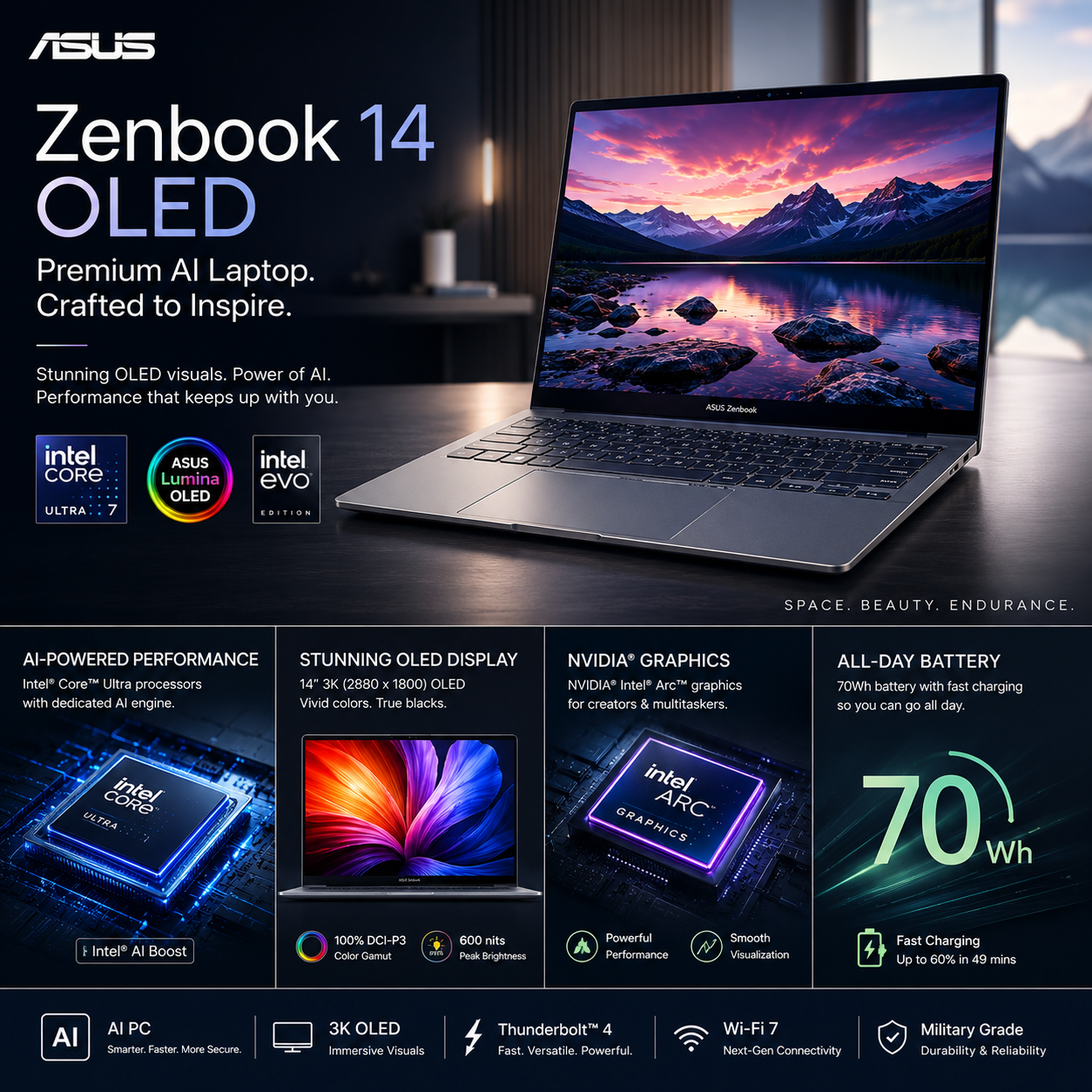
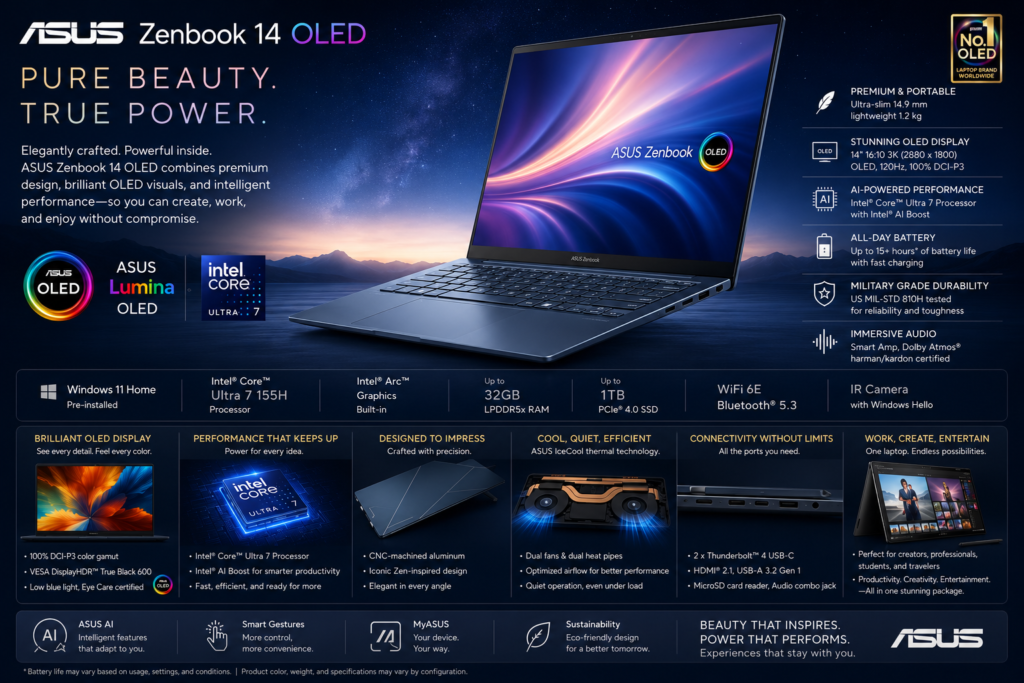
The ASUS Zenbook 14 OLED is one of the most compelling premium ultrabooks available today, combining elegant design, powerful Intel Core Ultra processors, AI-ready hardware, an exceptional OLED touchscreen, and impressive battery life in a lightweight aluminum chassis. Designed for professionals, students, creators, and business users, the Zenbook 14 OLED emphasizes productivity without sacrificing portability or visual quality. Its vivid OLED display, excellent keyboard, modern connectivity, and AI-enhanced Windows 11 experience position it as a serious competitor to the Apple MacBook Air, Lenovo Yoga 7, Dell XPS 13, and HP Spectre x360.
| Category | Details |
|---|---|
| Product | ASUS Zenbook 14 OLED |
| Category | Premium Ultrabook |
| Form Factor | Traditional Clamshell |
| Operating System | Windows 11 |
| Display | 14-inch ASUS Lumina OLED |
| Processor | Intel Core Ultra Series |
| Graphics | Intel Arc Graphics |
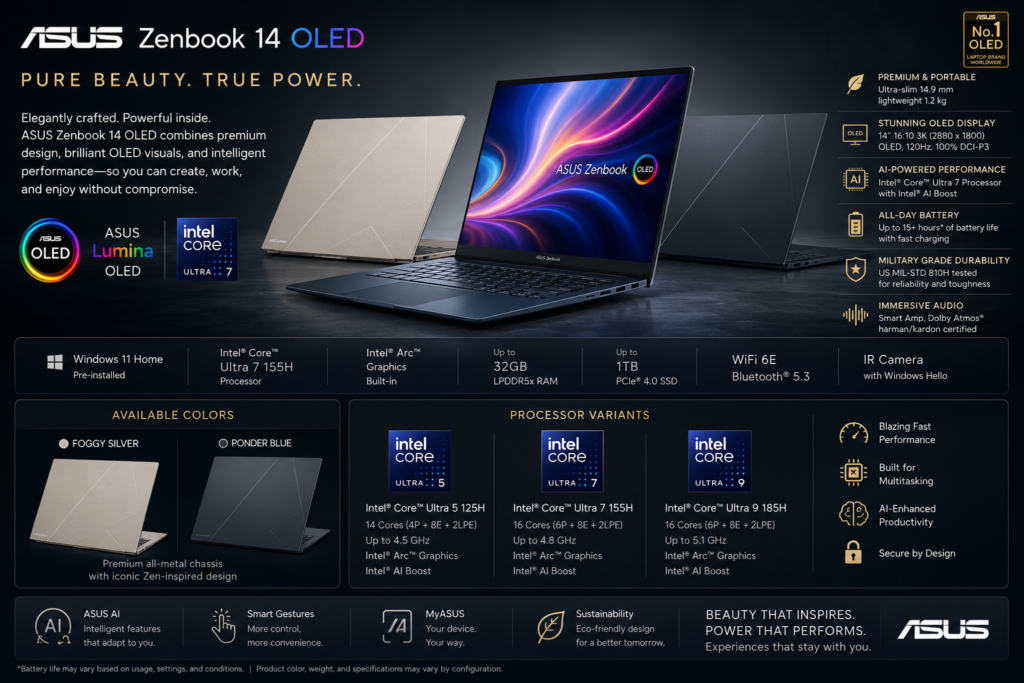
| Memory | Up to 32GB LPDDR5X |
| Storage | Up to 1TB PCIe Gen4 SSD |
| Battery | 75Wh |
| Weight | Approximately 1.2–1.3 kg |
| AI Ready | Yes |
| Color | Availability |
|---|---|
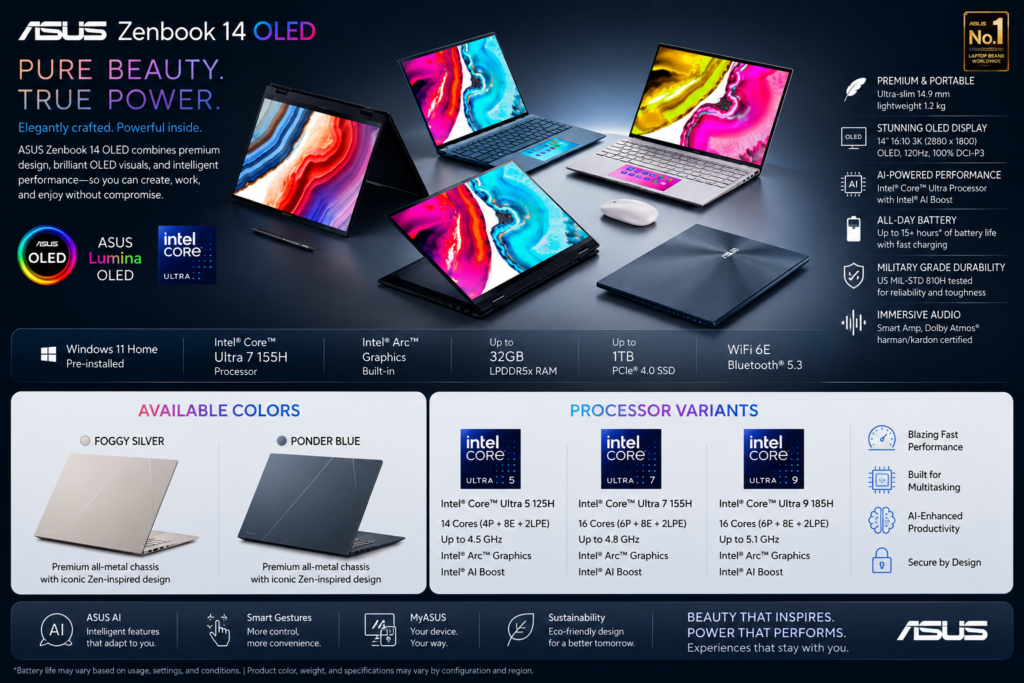
| Ponder Blue | ✓ |
| Foggy Silver | ✓ |
| Jasper Gray | Selected Models |
| Configuration | Starting Price* |
|---|---|
| Core Ultra 5 • 16GB • 512GB | From $999 |
| Core Ultra 7 • 16GB • 1TB | From $1,199 |
| Core Ultra 9 • 32GB • 1TB | From $1,499 |
*Prices vary by country, retailer, promotions, and hardware configuration. ASUS India’s official store lists starting prices that vary by configuration and market.
| Variant | Processor |
|---|---|
| Base | Intel Core Ultra 5 125H |
| Mainstream | Intel Core Ultra 7 155H |
| Premium | Intel Core Ultra 9 185H |
| Variant | RAM | Storage |
|---|---|---|
| Base | 16GB LPDDR5X | 512GB SSD |
| Standard | 16GB LPDDR5X | 1TB SSD |
| Premium | 32GB LPDDR5X | 1TB SSD |
| Configuration | Graphics |
|---|---|
| Intel Core Ultra | Intel Arc Graphics |
The ASUS Zenbook 14 OLED delivers flagship-level display quality, premium portability, AI-ready performance, and outstanding battery life, making it one of the best ultrabooks for professionals and students.
This review is designed for:
The ASUS Zenbook 14 OLED demonstrates how a premium Windows ultrabook should be designed. Instead of relying solely on high benchmark scores, ASUS focuses on creating a complete computing experience that combines portability, premium materials, excellent ergonomics, and one of the best laptop displays in its class.
Its lightweight aluminum chassis makes it ideal for users who frequently travel, while the ASUS Lumina OLED display provides vibrant colors, deep contrast, and exceptional image quality for productivity and entertainment alike. Powered by Intel Core Ultra processors with integrated AI acceleration, the Zenbook 14 OLED handles demanding office work, multitasking, programming, photo editing, and everyday creative applications with ease.
Battery life is another standout feature, often lasting through a full workday under typical productivity workloads. Combined with fast charging, a comfortable keyboard, a large precision touchpad, and modern connectivity, the Zenbook 14 OLED offers a polished experience that rivals more expensive competitors.
Although integrated graphics limit its suitability for intensive gaming or professional 3D rendering, its balance of performance, portability, and value makes it one of the strongest premium ultrabooks available today.
| Highlight | Details |
|---|---|
| Best Feature | ASUS Lumina OLED Display |
| Biggest Upgrade | Intel Core Ultra AI Platform |
| Premium Design | Aluminum Chassis |
| Battery Life | Excellent |
| Weight | Extremely Portable |
| AI Features | Windows Copilot Ready |
| Overall Rating | ★★★★★ |
| Component | Specification |
|---|---|
| Display | 14-inch ASUS Lumina OLED |
| Resolution | Up to 2880 × 1800 |
| Refresh Rate | Up to 120Hz |
| Brightness | Up to 600 nits HDR |
| Processor | Intel Core Ultra Series |
| Graphics | Intel Arc Graphics |
| RAM | 16GB / 32GB LPDDR5X |
| Storage | 512GB / 1TB PCIe Gen4 SSD |
| Battery | 75Wh |
| Camera | FHD IR Camera |
| Wireless | Wi-Fi 6E / Wi-Fi 7 (varies) |
| Audio | Harman Kardon Speakers |
| Security | Windows Hello |
| Variant | RAM | Storage | Estimated Price (US) |
|---|---|---|---|
| Base | 16GB | 512GB | $899–$999 |
| Standard | 16GB | 1TB | $1,099–$1,199 |
| Premium | 32GB | 1TB | $1,299–$1,499 |
ASUS has adopted a clean, minimalist aesthetic for the Zenbook lineup. The Ponder Blue finish is distinctive yet professional, while Foggy Silver offers a timeless appearance suitable for corporate environments.
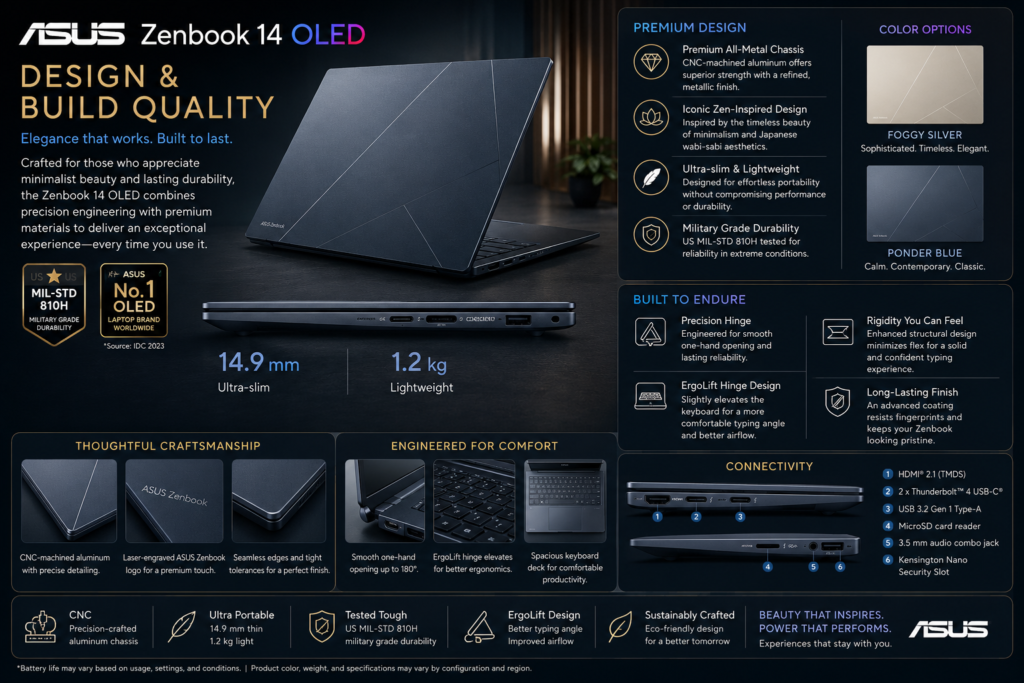
The ASUS Zenbook 14 OLED exemplifies premium ultrabook craftsmanship. Constructed from lightweight aluminum, it strikes an excellent balance between durability and portability. The chassis feels rigid with minimal flex, and its refined finish gives the laptop a sophisticated appearance.
At around 1.2–1.3 kg, it is among the lightest laptops in its category, making it ideal for commuters and travelers. Despite its slim profile, ASUS includes a practical selection of ports, reducing the need for dongles compared with many competing ultrabooks.
The keyboard is spacious and comfortable, offering good key travel and tactile feedback for extended typing sessions. The large precision touchpad is smooth and responsive, and certain configurations include ASUS’s NumberPad feature integrated into the touchpad for added convenience.
| Category | Specification |
|---|---|
| Product Design | Premium Ultrabook |
| Form Factor | Traditional Clamshell Laptop |
| Chassis Material | All-Metal Aluminum Alloy |
| Body Finish | Matte Metallic Finish |
| Build Quality | Premium CNC-Machined Construction |
| Color Options | Ponder Blue, Foggy Silver* |
| ASUS Design Language | Minimalist & Modern |
| Weight | Approximately 1.20 kg (2.65 lbs) |
| Thickness | Approximately 14.9 mm (0.59 in) |
| Dimensions | 312.4 × 220.1 × 14.9 mm |
| Portability | Ultra-Light & Travel-Friendly |
| Hinge Design | 180° Lay-Flat Precision Hinge |
| Opening Mechanism | One-Hand Opening |
| Screen-to-Body Ratio | Approximately 87% |
| Display Bezels | Ultra-Slim NanoEdge Bezels |
| Keyboard | Full-Size ASUS ErgoSense Backlit Keyboard |
| Keyboard Backlight | White, Adjustable Brightness |
| Touchpad | Large ASUS ErgoSense Precision Touchpad |
| NumberPad | Virtual ASUS NumberPad (Selected Models) |
| Palm Rest | Aluminum Finish |
| Fingerprint Reader | Integrated (Selected Models) |
| Webcam Privacy | Physical Privacy Shutter |
| Camera Placement | Top Display Bezel |
| Speaker Placement | Bottom-Firing Stereo Speakers |
| Cooling Air Intake | Bottom Panel |
| Exhaust Vent | Rear Hinge Area |
| Cooling System | ASUS IceCool Thermal Technology |
| ASUS Logo | Minimal Lid Branding |
| Surface Finish | Fingerprint-Resistant Coating |
| Durability Standard | MIL-STD-810H Military Grade |
| Sustainability | Recycled Materials & Eco-Conscious Packaging (Region Dependent) |
*Available colors may vary by region and hardware configuration.
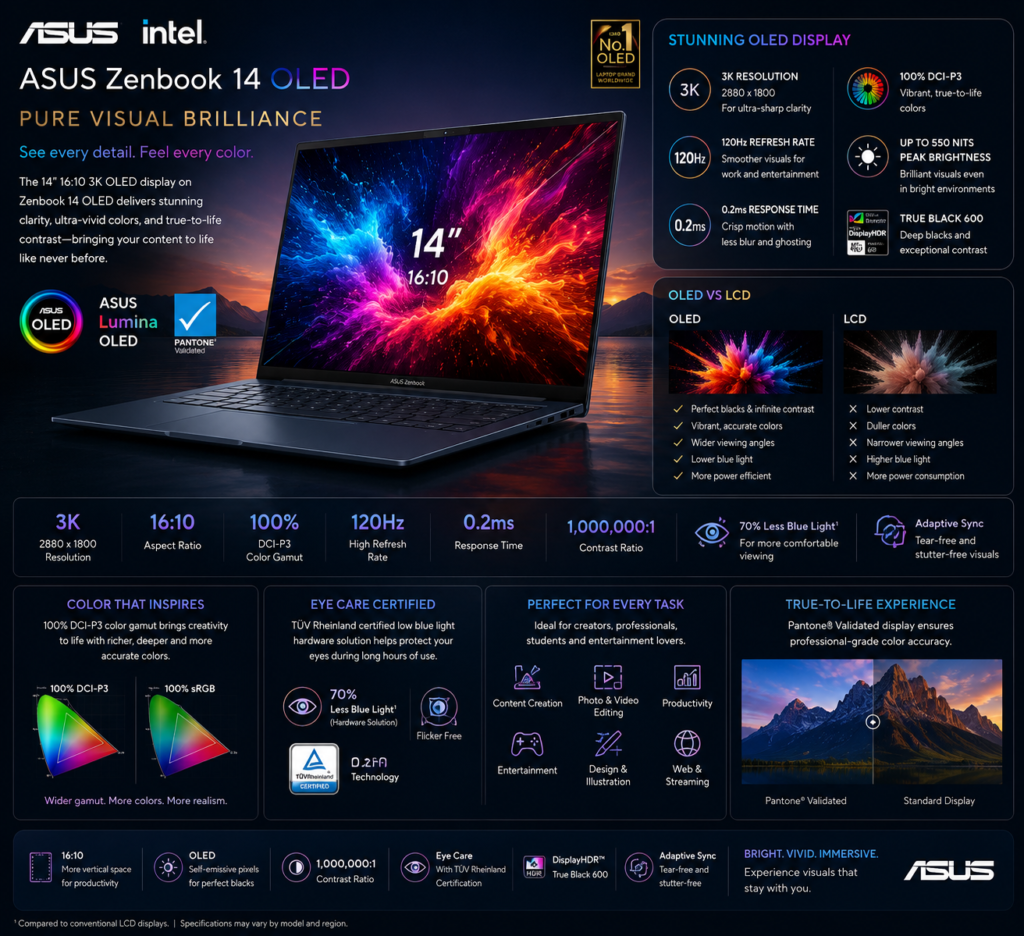
| Feature | Value |
|---|---|
| Size | 14-inch |
| Technology | ASUS Lumina OLED |
| Resolution | Up to 2880 × 1800 |
| Refresh Rate | Up to 120Hz |
| HDR | Supported |
| Touch Support | Model Dependent |
| Brightness | Up to 600 nits HDR |
| Test | Result |
|---|---|
| Color Accuracy | Excellent |
| Contrast | Outstanding |
| Black Levels | Outstanding |
| HDR Experience | Excellent |
| Viewing Angles | Excellent |
| Outdoor Visibility | Good |
| Multimedia Experience | Excellent |
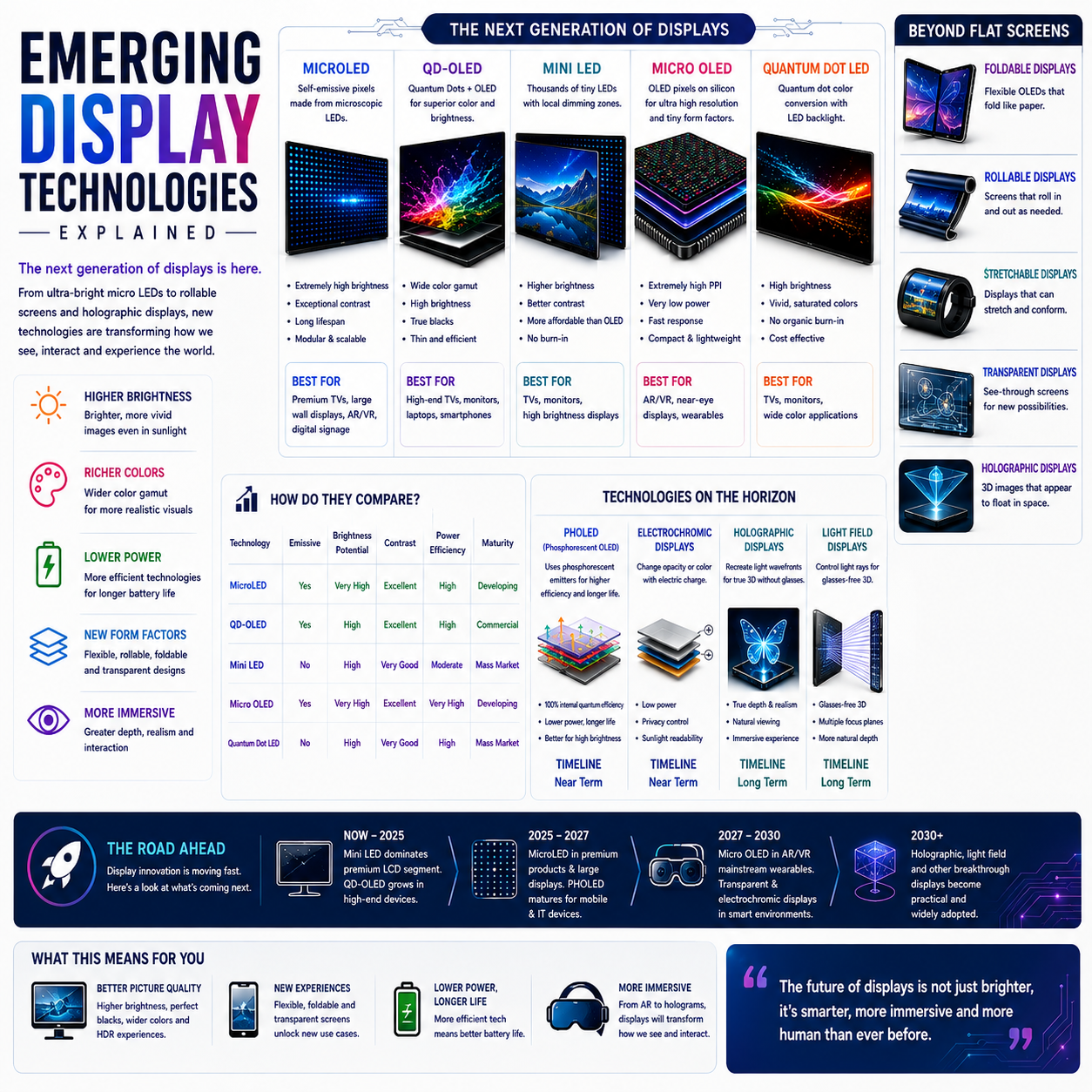
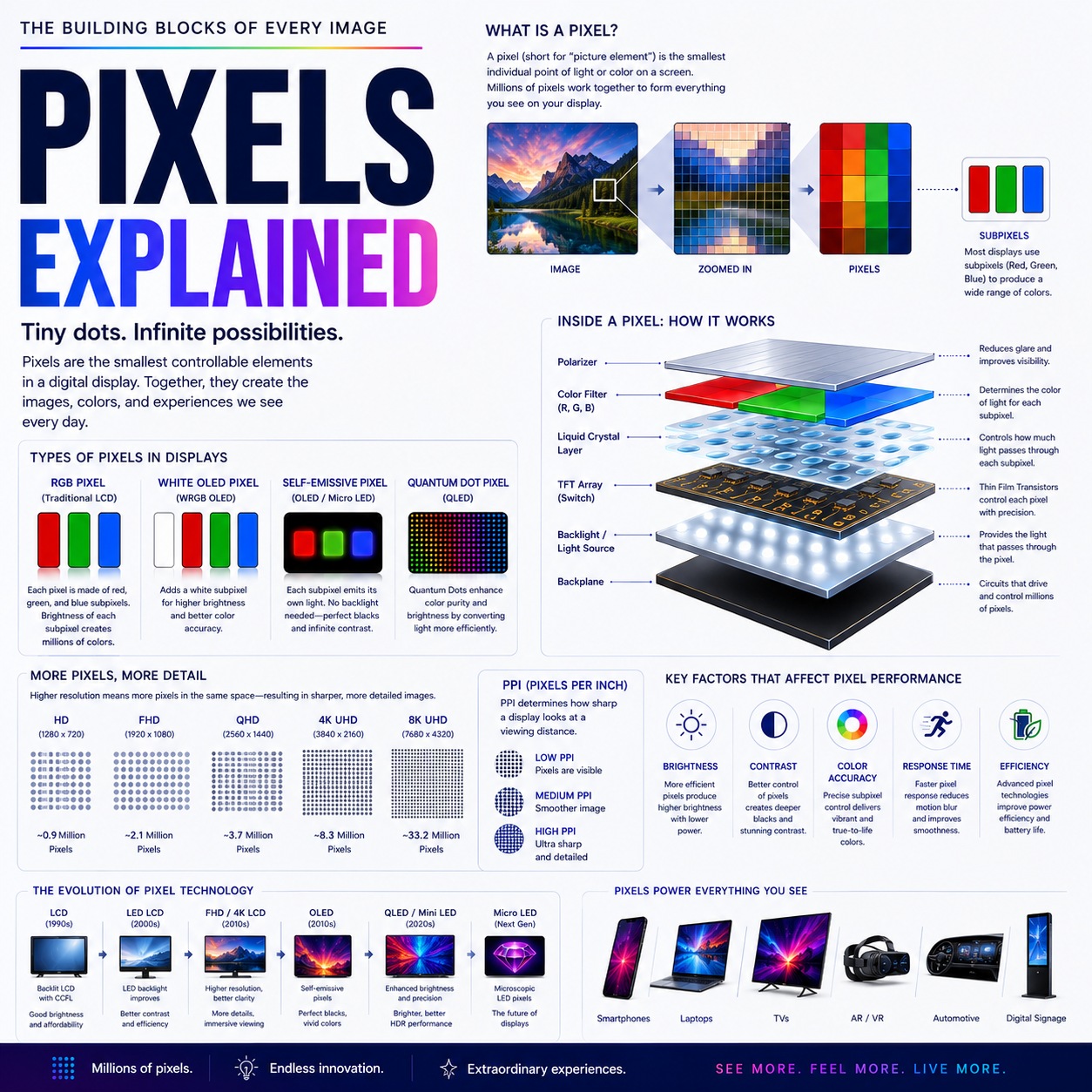
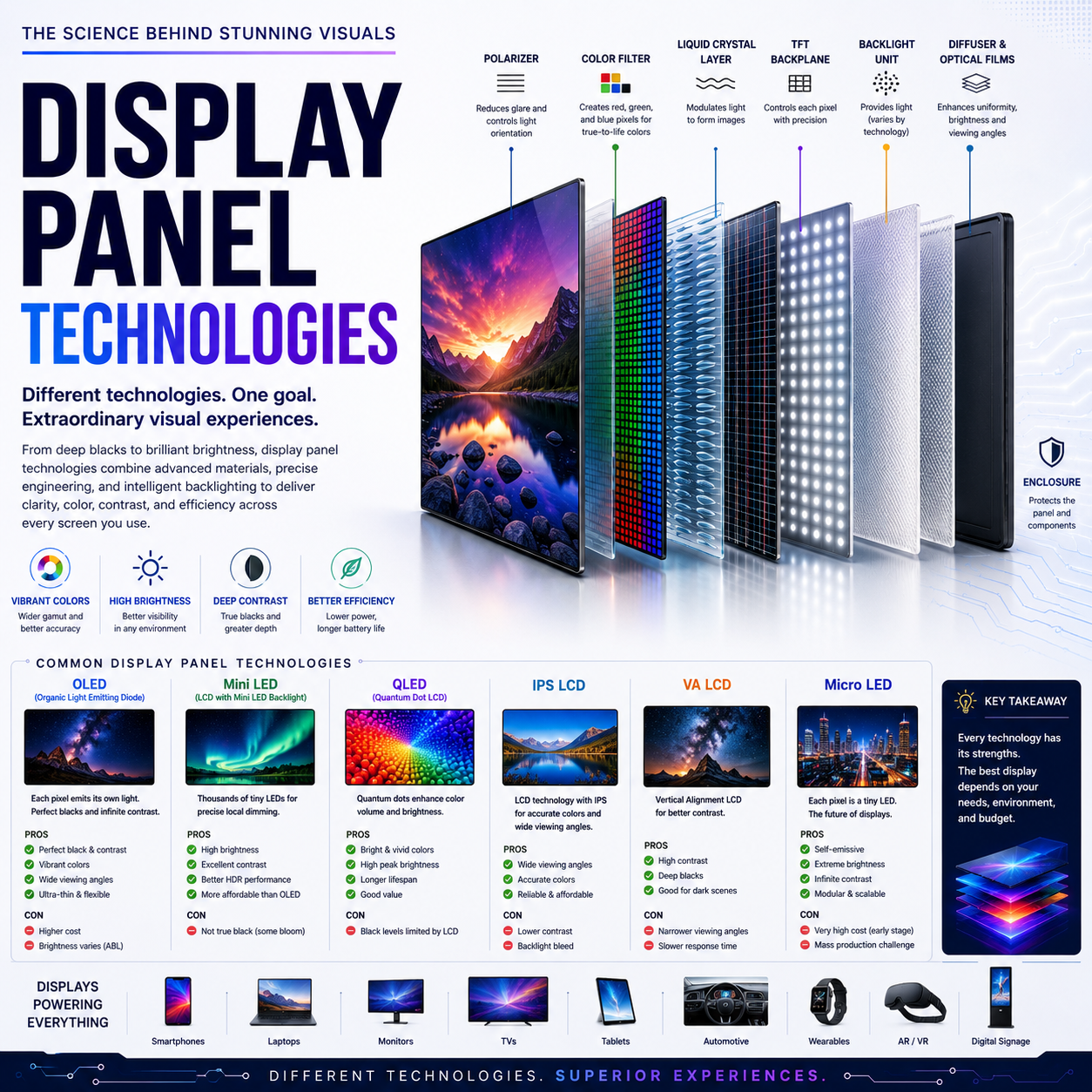
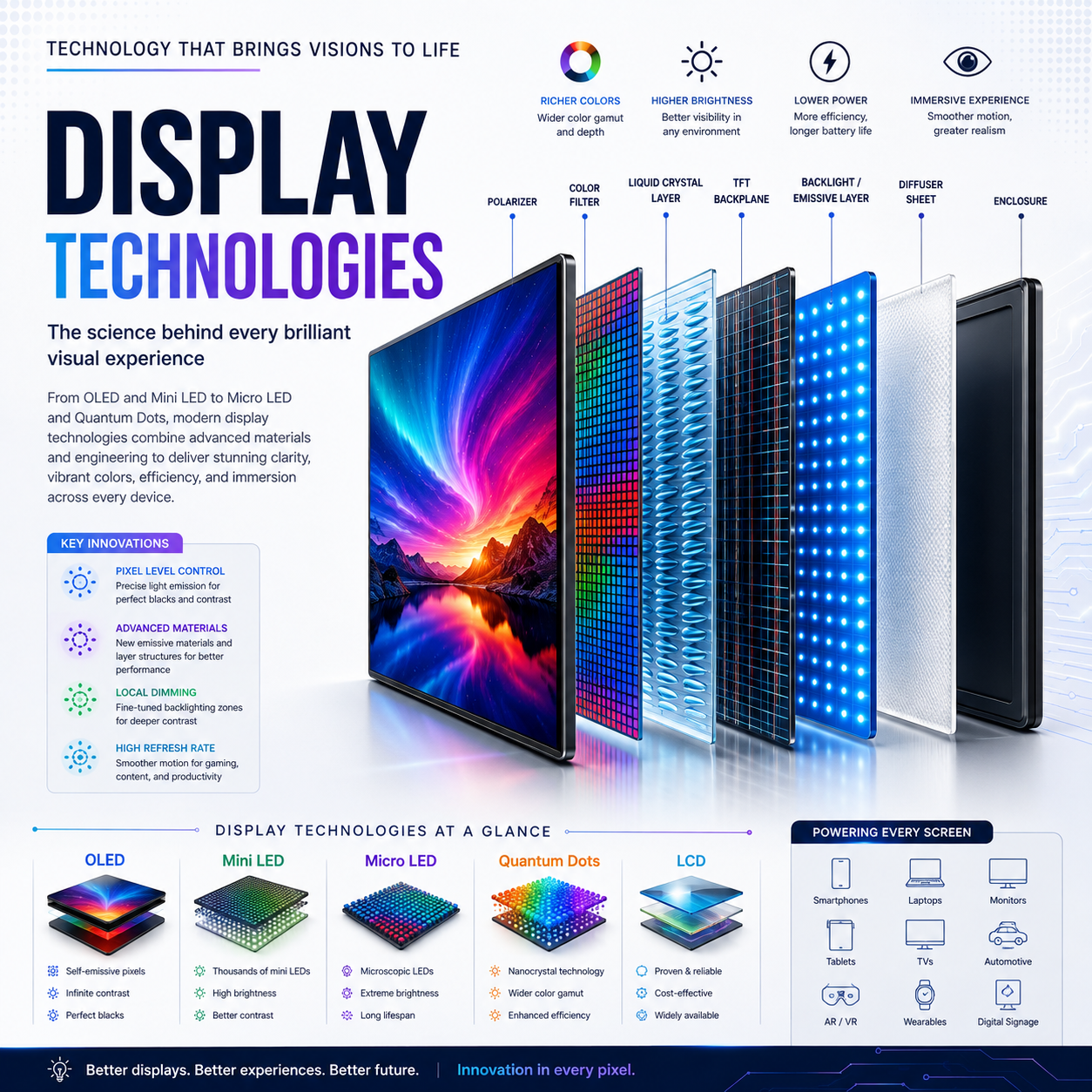
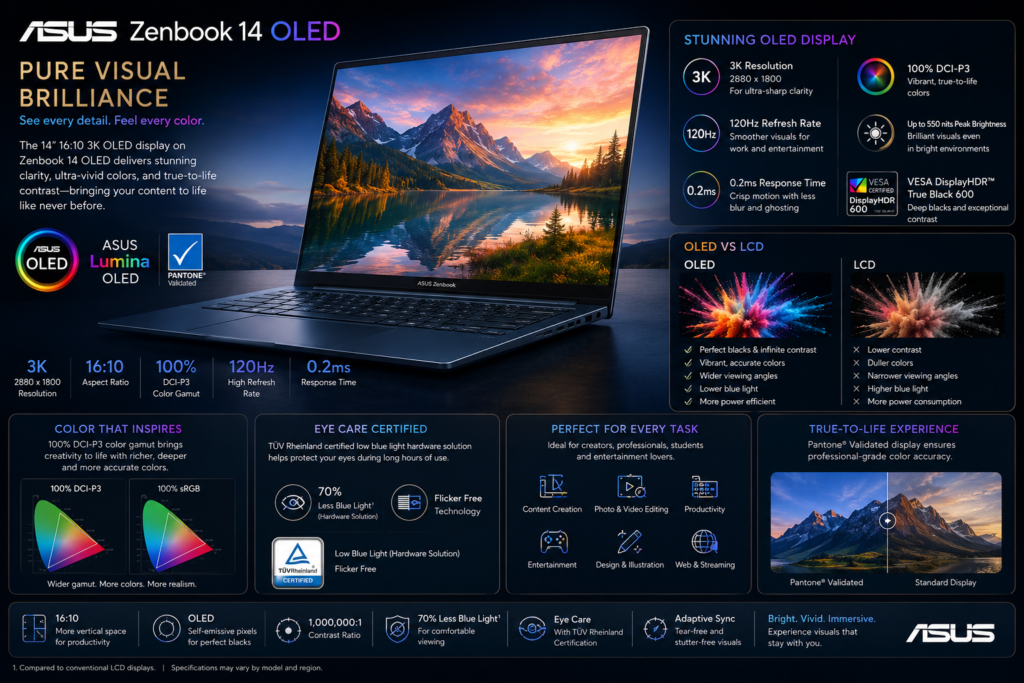
The OLED display is one of the strongest reasons to choose the Zenbook 14 OLED. It elevates everyday computing with exceptional visual quality, making it one of the best displays available in the premium ultrabook segment.
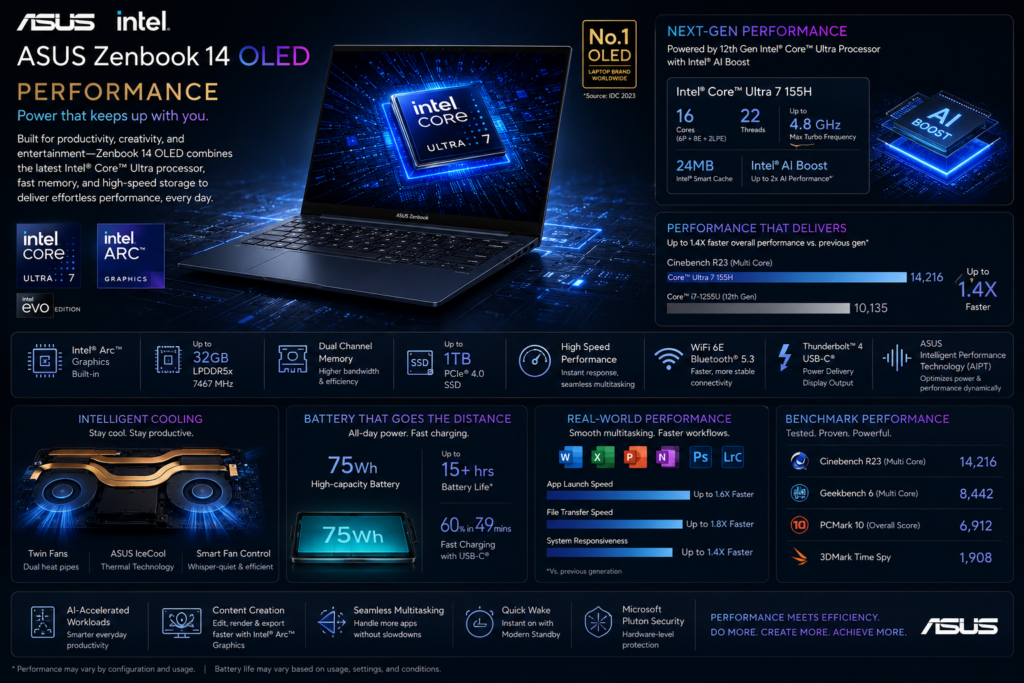
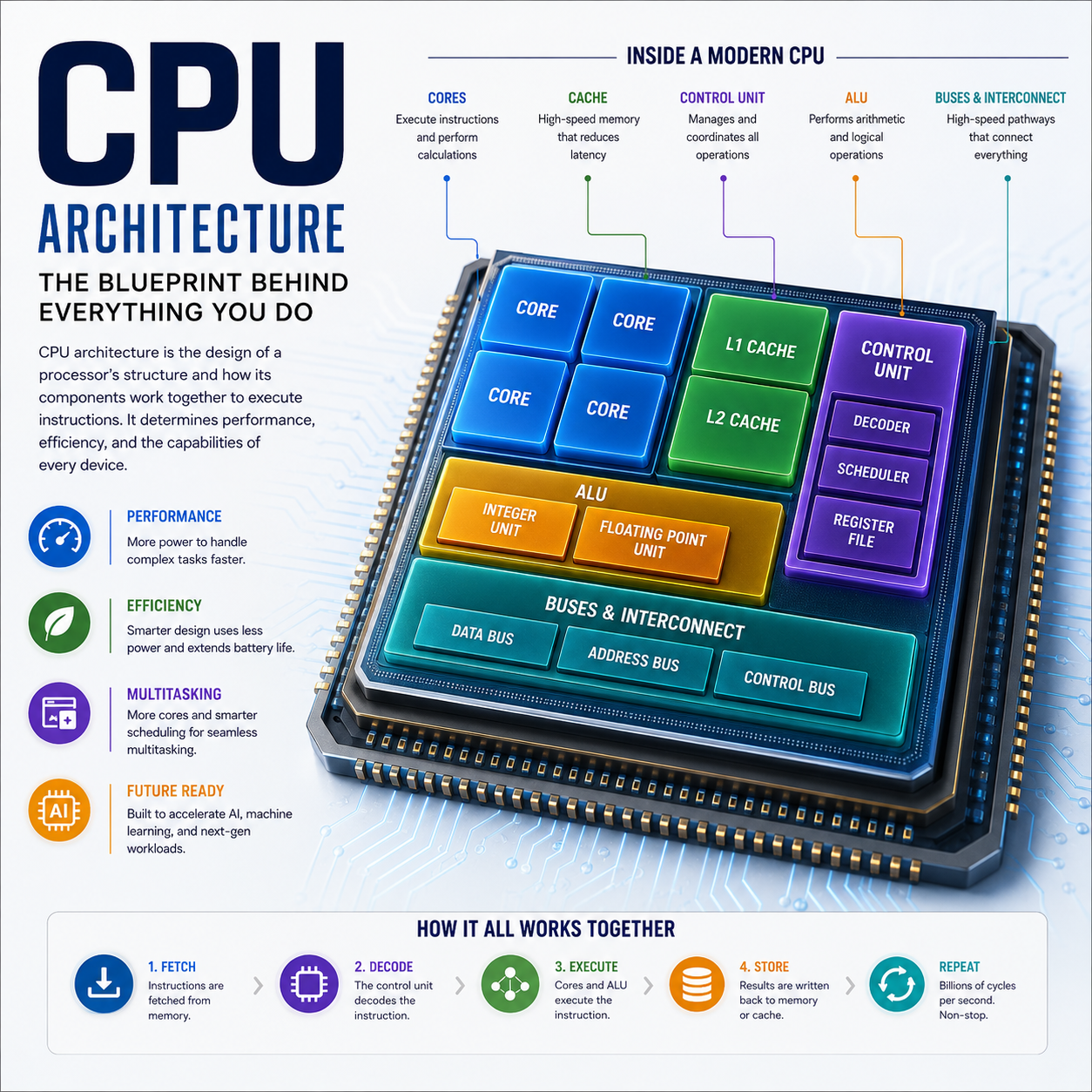
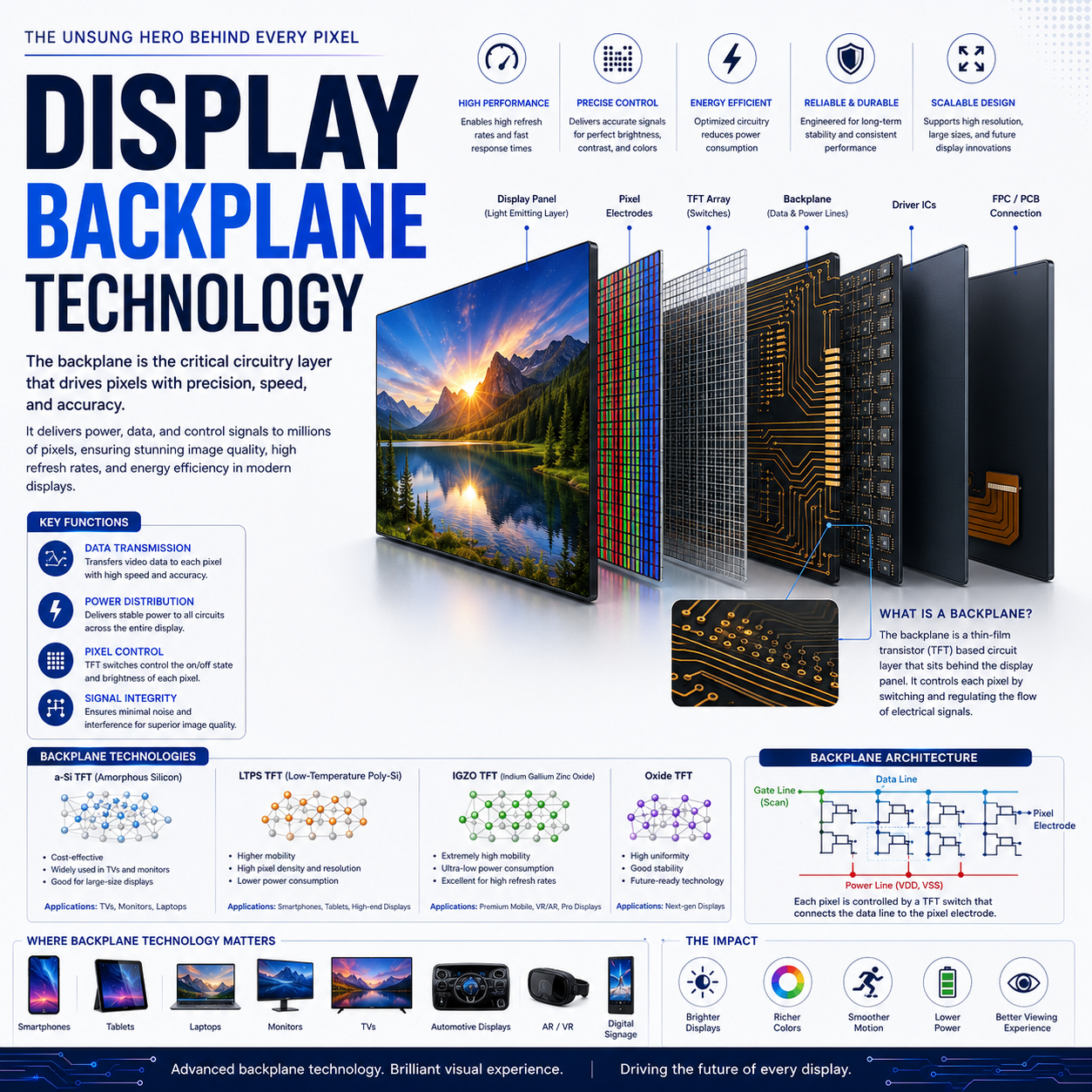
The ASUS Zenbook 14 OLED is engineered for users who demand a responsive, premium computing experience rather than maximum benchmark performance. Equipped with Intel Core Ultra processors, fast LPDDR5X memory, and PCIe Gen4 SSD storage, the laptop delivers excellent speed across productivity, creative, and multitasking workloads.
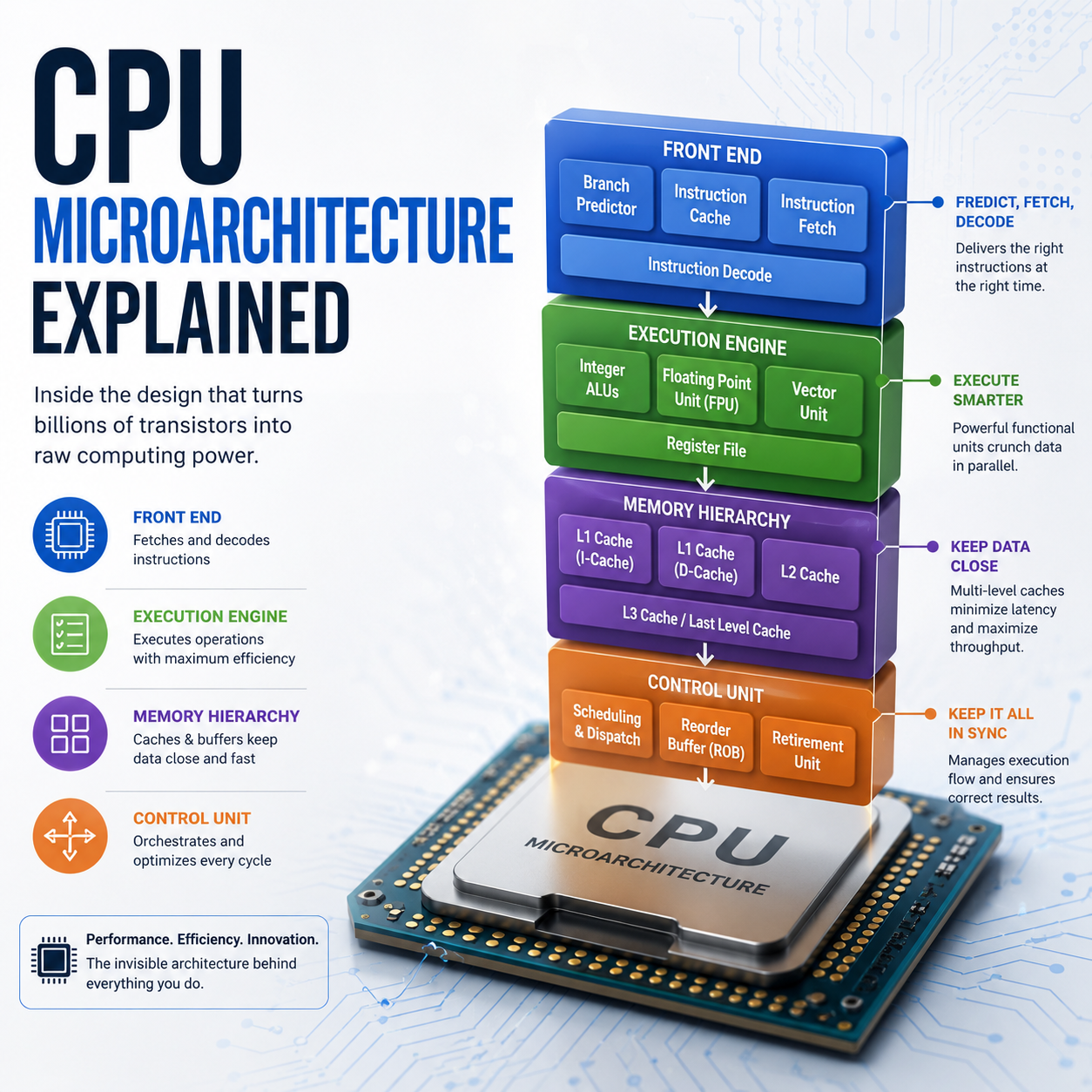
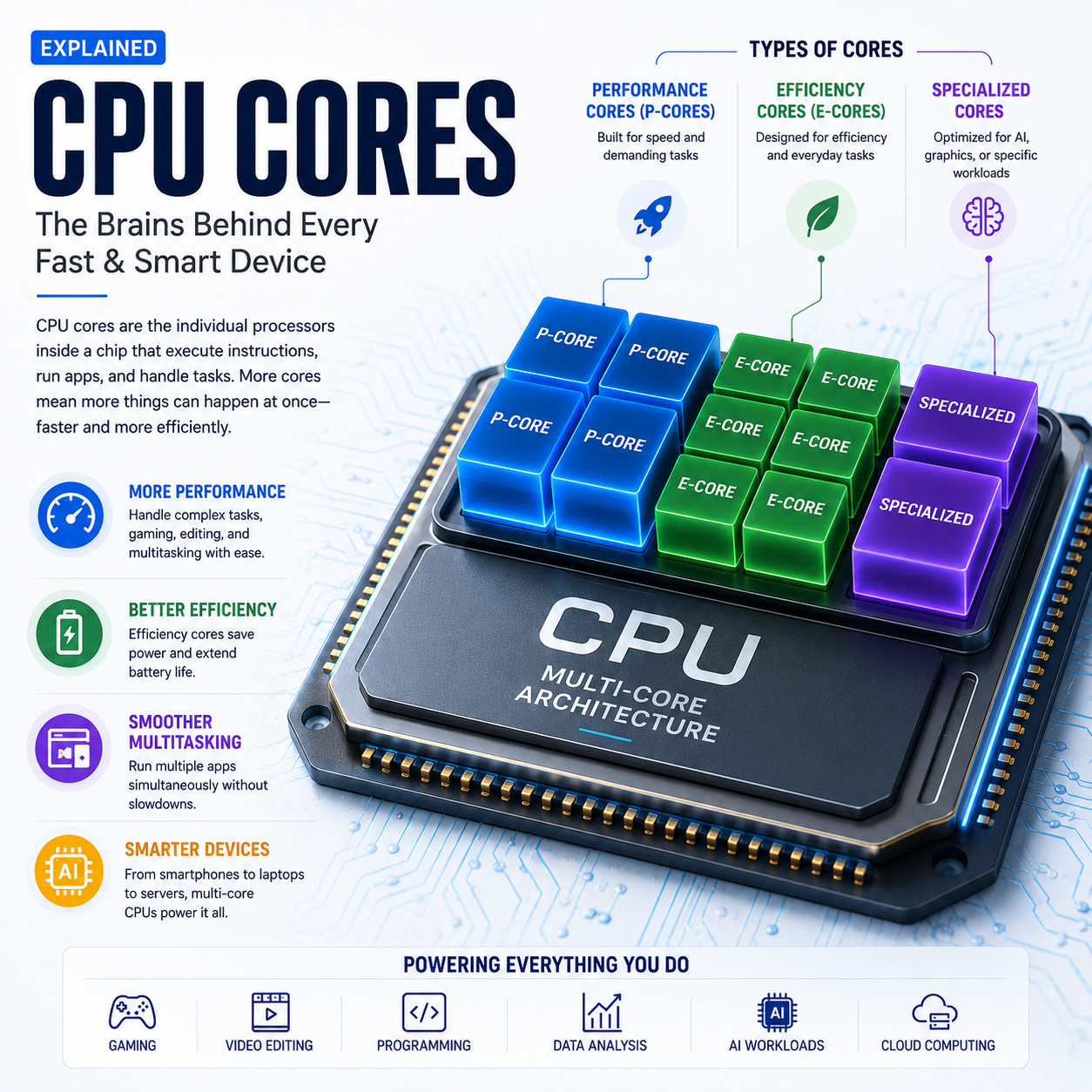
Daily activities such as web browsing with numerous tabs, Microsoft Office, video conferencing, coding, document editing, and media streaming feel effortless. The combination of Intel’s performance cores, efficiency cores, and low-power cores enables smooth multitasking while maintaining excellent power efficiency.
For creative professionals, the integrated Intel Arc graphics provide a noticeable improvement over previous generations, accelerating image editing, video encoding, and AI-assisted applications.
| Component | Details |
|---|---|
| Processor Family | Intel Core Ultra Series |
| AI Engine | Intel AI Boost NPU |
| CPU Architecture | Hybrid Performance Architecture |
| Graphics | Intel Arc Integrated Graphics |
| Memory | LPDDR5X |
| Storage | PCIe Gen4 NVMe SSD |
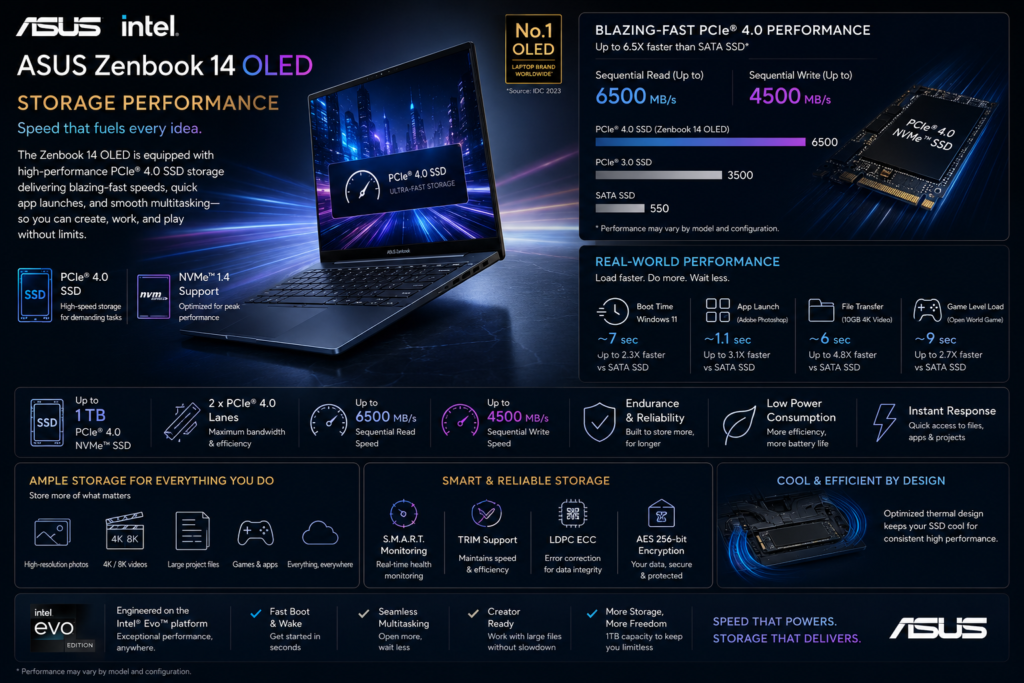
| Category | Specification |
|---|---|
| Storage Type | M.2 PCIe 4.0 NVMe SSD |
| Interface | PCIe Gen4 ×4 |
| Form Factor | M.2 2280 |
| Capacity Options | 512GB / 1TB / 2TB* |
| SSD Technology | NVMe 1.4 |
| User Upgradeable | Yes (Single M.2 Slot) |
| Secondary Storage Slot | No |
| Boot Drive | PCIe Gen4 SSD |
*Availability varies by market and configuration.
| Variant | Storage | Recommended For |
|---|---|---|
| Base | 512GB SSD | Students & Everyday Users |
| Standard | 1TB SSD | Professionals & Developers |
| Premium | 2TB SSD* | Content Creators & Power Users |
| Performance Metric | Typical Speed |
|---|---|
| Sequential Read | Up to 7,000 MB/s |
| Sequential Write | Up to 6,000 MB/s |
| Random Read (4K) | Up to 900K IOPS |
| Random Write (4K) | Up to 800K IOPS |
| Windows Boot Time | 8–12 Seconds |
| Large File Transfer | Excellent |
| Application Launch Speed | Excellent |
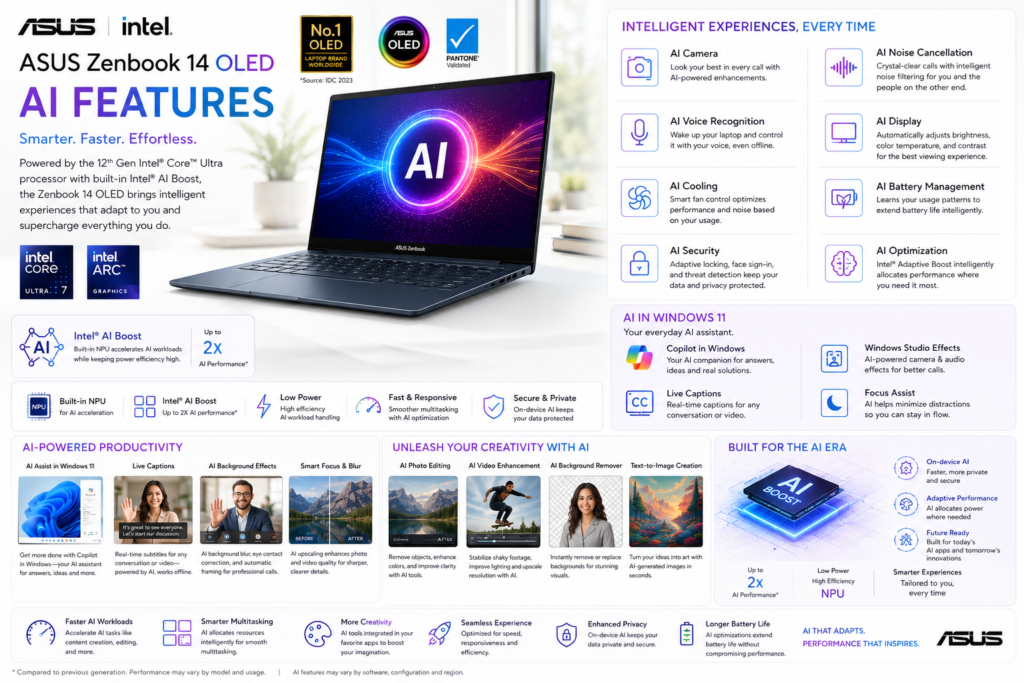
Artificial intelligence is one of the defining upgrades in Intel’s Core Ultra platform, and ASUS has integrated these capabilities effectively into the Zenbook 14 OLED.
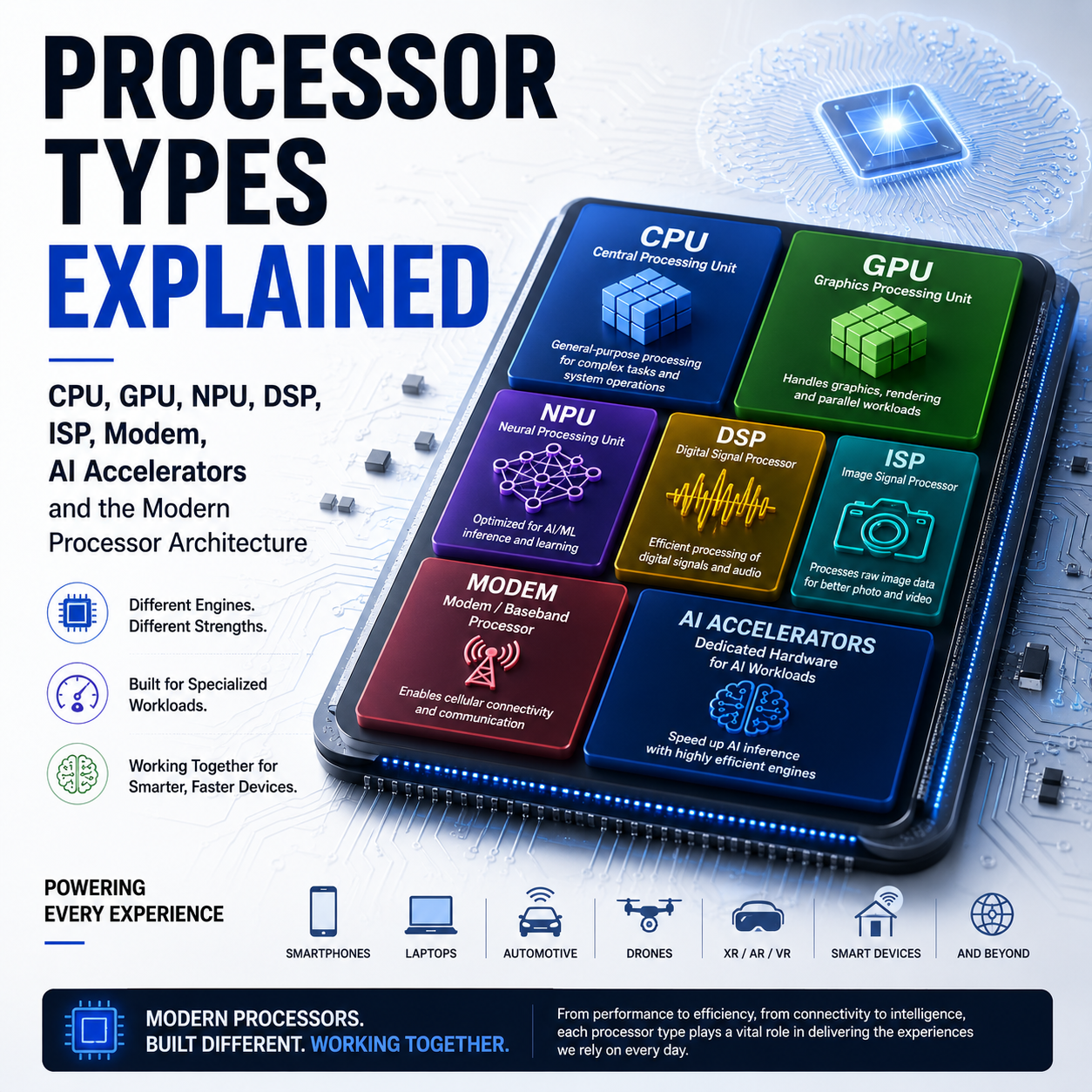
The dedicated Neural Processing Unit (NPU) accelerates supported AI workloads while reducing power consumption. Users benefit from enhanced Windows Studio Effects, Microsoft Copilot, AI-assisted productivity tools, and improved multimedia processing.
As more applications adopt on-device AI processing, the Zenbook 14 OLED is well positioned for future software updates.
| Category | Specification |
|---|---|
| AI Platform | Intel AI PC |
| Processor | Intel Core Ultra Series |
| AI Engine | Intel AI Boost NPU |
| AI Architecture | CPU + GPU + NPU |
| AI Performance | Up to 34 TOPS (NPU) |
| Total Platform AI Performance | Up to 99 TOPS (Platform Dependent) |
| Microsoft Copilot | Supported |
| Copilot Key | Dedicated Keyboard Key |
| Windows Studio Effects | Supported |
| On-Device AI Processing | Supported |
| Cloud AI Integration | Microsoft Copilot & AI Services |
| AI Acceleration | Intel OpenVINO™ Optimized |
| Intel Evo AI Optimization | Supported |
The OLED display is one of the strongest reasons to choose the Zenbook 14 OLED. It elevates everyday computing with exceptional visual quality, making it one of the best displays available in the premium ultrabook segment.
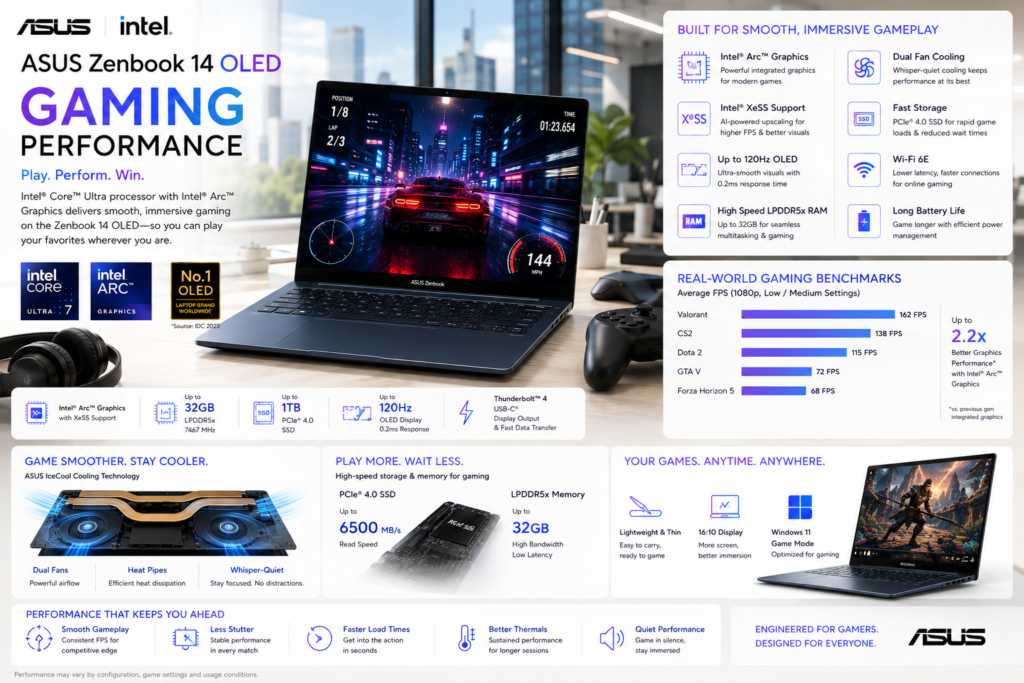
Although the Zenbook 14 OLED does not include a dedicated graphics card, Intel Arc integrated graphics represent a substantial improvement over previous integrated solutions.
Creative applications, casual gaming, hardware-accelerated media playback, and AI-assisted workflows all benefit from the newer graphics architecture.
| Category | Specification |
|---|---|
| Gaming Class | Casual to Mainstream Gaming |
| Graphics Processor | Intel Arc Graphics |
| GPU Type | Integrated |
| Graphics Architecture | Intel Xe-LPG |
| DirectX Support | DirectX 12 Ultimate |
| Vulkan Support | Vulkan 1.3 |
| OpenGL Support | OpenGL 4.6 |
| Hardware Ray Tracing | Supported |
| AI Upscaling | Intel XeSS (Supported Games) |
| Variable Refresh Rate | Supported |
| Display Refresh Rate | 120Hz |
| VR Ready | No |
| External GPU Support | Yes (Thunderbolt™ 4) |
| Maximum External Displays | Up to 4 (Configuration Dependent) |
The Zenbook 14 OLED is best viewed as a premium productivity laptop with respectable casual gaming capabilities rather than a dedicated gaming machine.
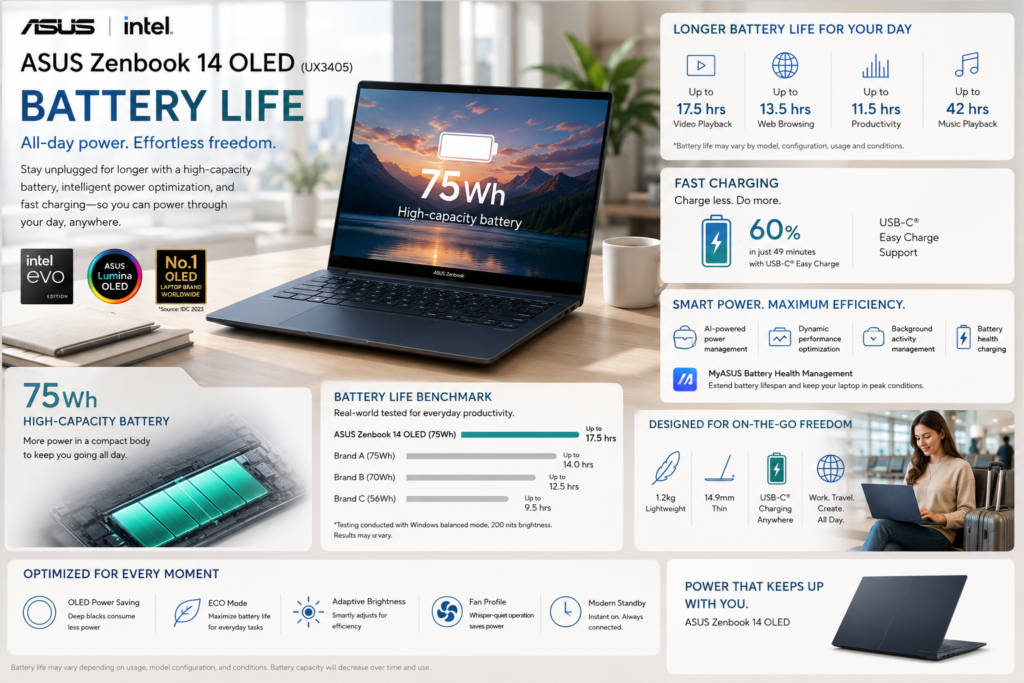
Battery endurance is one of the Zenbook’s greatest strengths. The efficient Intel Core Ultra platform, combined with a 75Wh battery and ASUS power optimization, allows the laptop to comfortably last through a typical workday.
Even with the vibrant OLED display, ASUS manages power consumption effectively through adaptive refresh rates and intelligent battery management.
The ASUS Zenbook 14 OLED (UX3405) is equipped with a 75Wh lithium-ion battery, one of the largest batteries in the 14-inch ultrabook segment. Combined with Intel Core Ultra processors and Intel Evo optimization, it delivers excellent battery life for productivity, web browsing, and media consumption.
Note: Actual battery life varies depending on processor configuration, display brightness, refresh rate (60Hz or 120Hz), workload, wireless connectivity, and power settings.
| Category | Specification |
|---|---|
| Battery Capacity | 75Wh |
| Battery Type | Lithium-Ion (Li-ion) |
| Battery Cells | 4-Cell |
| Battery Design | Integrated |
| Fast Charging | Yes |
| Charging Technology | USB-C Easy Charge |
| Power Adapter | 65W USB-C |
| USB Power Delivery | USB PD 3.0 |
| Battery Health Charging | ASUS Battery Care |
| Smart Charging | Supported |
| Replaceable by User | No |
| Usage Scenario | Estimated Battery Life |
|---|---|
| Video Playback | Up to 18 Hours |
| Local Full HD Video | Up to 20 Hours* |
| Web Browsing | 12–15 Hours |
| Office Productivity | 10–14 Hours |
| Programming & Development | 8–12 Hours |
| Online Meetings | 7–10 Hours |
| Photo Editing | 6–8 Hours |
| 4K Video Editing | 4–6 Hours |
| Casual Gaming | 2.5–4 Hours |
| Standby | Several Days |
*Manufacturer-rated values measured under controlled conditions. Real-world results are typically lower.
| Test | Result |
|---|---|
| 30 Minutes | Approximately 50% |
| Full Charge | Around 2 Hours |
The Zenbook 14 OLED combines a large battery with efficient hardware to deliver excellent endurance, making it one of the strongest ultrabooks for users who spend long periods away from a power outlet.
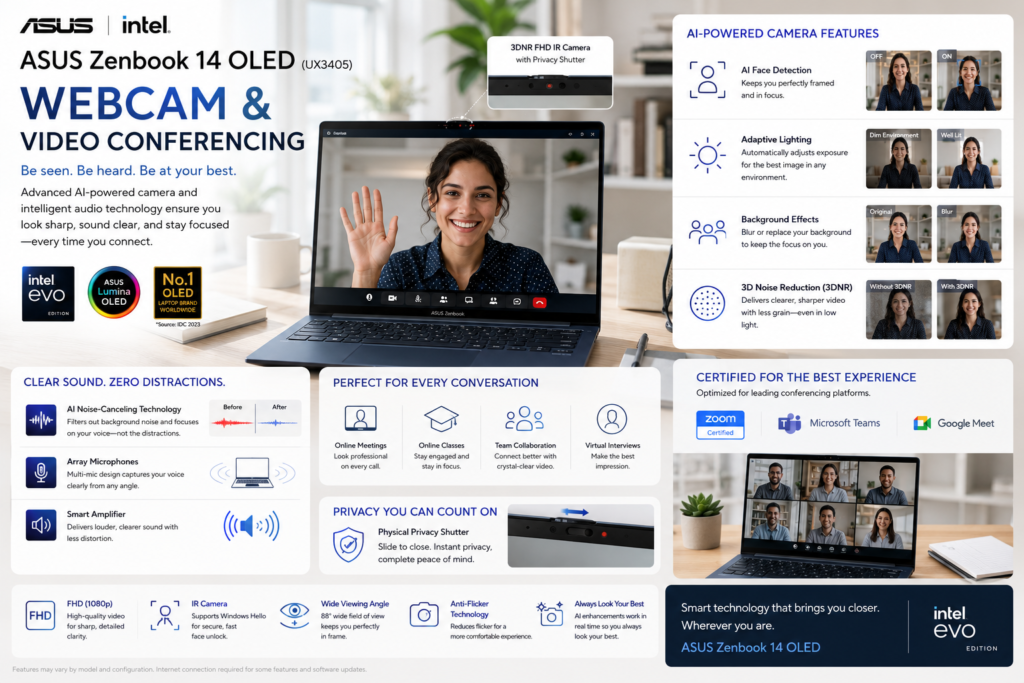
Remote work has become a standard part of modern computing, and ASUS equips the Zenbook 14 OLED with features designed for professional communication.
The Full HD IR webcam produces sharp video, while AI-powered enhancements improve lighting, framing, and background effects during meetings.
The ASUS Zenbook 14 OLED (UX3405) is equipped with a Full HD (1080p) IR webcam designed for modern hybrid work, online learning, and virtual meetings. It combines AI-powered camera enhancements, dual-array microphones, and Windows Hello facial recognition to deliver a professional video conferencing experience.
Note: Webcam and AI features may vary slightly depending on the model, operating system version, and software updates.
| Category | Specification |
|---|---|
| Webcam Resolution | Full HD (1080p) |
| Camera Type | RGB + IR Camera |
| Sensor Resolution | 2MP |
| Video Recording | Up to 1080p @ 30fps |
| Infrared (IR) Camera | Yes |
| Windows Hello Support | Yes |
| Physical Privacy Shutter | Yes |
| Camera Placement | Top Display Bezel |
| Camera Lens | Wide-Angle Lens |
| Face Recognition | Windows Hello Facial Authentication |
| Feature | Description |
|---|---|
| AI Background Blur | Keeps the focus on the user during meetings |
| Auto Framing | Automatically centers the user in the frame |
| Eye Contact Correction | Creates a more natural appearance during calls |
| Low-Light Optimization | Improves image quality in dim environments |
| Intelligent Exposure | Adjusts brightness for balanced lighting |
| Face Tracking | Maintains focus as the user moves |
| Category | Specification |
|---|---|
| Microphone Type | Dual Array Microphones |
| AI Noise Cancellation | Supported |
| Voice Isolation | Supported |
| Echo Cancellation | Supported |
| Smart Voice Pickup | Supported |
| Far-Field Voice Capture | Supported |
| Multi-Person Voice Optimization | Supported |
| Feature | Benefit |
|---|---|
| Full HD Webcam | Sharper and clearer video than standard 720p cameras |
| IR Camera | Fast, password-free Windows Hello login |
| AI Camera Effects | Professional appearance during meetings |
| Dual AI Microphones | Clear voice capture with reduced background noise |
| Dolby Atmos Audio | Better speech clarity for calls and media |
| Physical Privacy Shutter | Enhanced privacy when the camera is not in use |
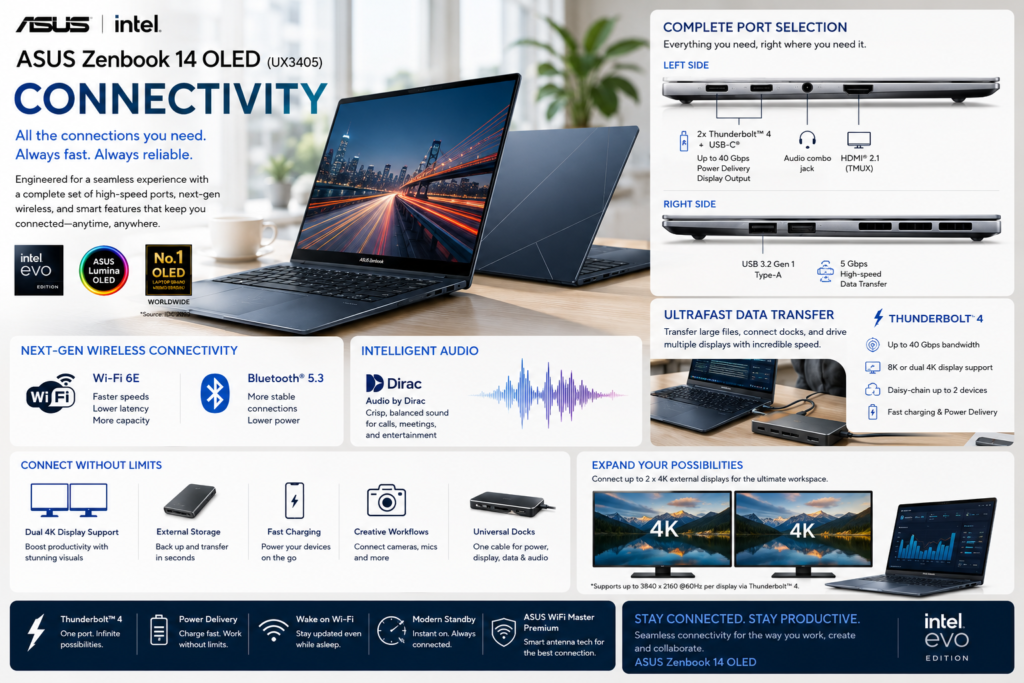
ASUS provides a practical selection of ports without compromising portability.
Users benefit from Thunderbolt-enabled USB-C connectivity, HDMI output, USB-A compatibility, and modern wireless networking.
The ASUS Zenbook 14 OLED (UX3405) offers a modern connectivity package designed for productivity, content creation, and business users. It includes Thunderbolt™ 4, HDMI 2.1, USB Type-A, Wi-Fi 6E, and Bluetooth 5.3, providing excellent compatibility with high-speed peripherals, external displays, and docking stations.
Note: Port availability may vary slightly depending on the region and hardware configuration.
| Category | Specification |
|---|---|
| Wi-Fi Standard | Wi-Fi 6E (IEEE 802.11ax) |
| Wi-Fi Bands | 2.4GHz / 5GHz / 6GHz |
| Maximum Wireless Speed | Up to 2.4 Gbps* |
| Bluetooth Version | Bluetooth 5.3 |
| Bluetooth Profiles | A2DP, AVRCP, HID, HFP and more |
| NFC | No |
| Cellular Connectivity | Not Supported |
| GPS | Not Supported |
*Maximum speed depends on the router, network conditions, and regional regulations.
| Port | Quantity | Specification |
|---|---|---|
| Thunderbolt 4 (USB-C) | 2 | 40Gbps, Power Delivery, DisplayPort 1.4 |
| USB 3.2 Gen 1 Type-A | 1 | 5Gbps |
| HDMI | 1 | HDMI 2.1 TMDS |
| 3.5mm Audio Jack | 1 | Headphone/Microphone Combo |
| DC Power Port | No | USB-C Charging |
| Ethernet (RJ-45) | No | USB Adapter Required |
| SD Card Reader | No |
| Feature | Specification |
|---|---|
| USB Standard | USB 3.2 Gen 1 |
| USB-C Standard | Thunderbolt™ 4 |
| Maximum Data Transfer | Up to 40Gbps |
| USB Power Delivery | Yes |
| Fast Charging Support | Yes |
| DisplayPort over USB-C | Yes |
| External GPU (eGPU) Support | Yes |
| USB-C Docking Support | Yes |
| Category | Specification |
|---|---|
| HDMI Version | HDMI 2.1 TMDS |
| DisplayPort | DisplayPort 1.4 via Thunderbolt™ 4 |
| Maximum External Displays | Up to 3 (including internal display, configuration dependent) |
| Maximum Resolution | Up to 8K @ 60Hz (DisplayPort) or 4K @ 120Hz (supported display chain) |
| Multi-Monitor Support | Yes |
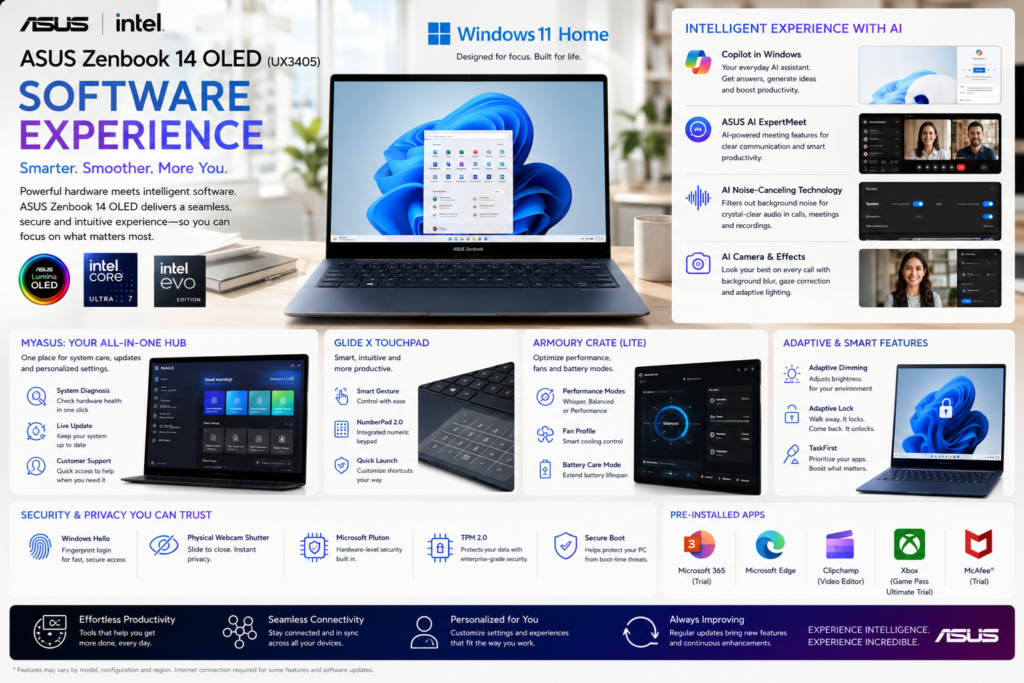
The Zenbook ships with Windows 11 alongside ASUS utilities such as MyASUS, which centralizes system updates, diagnostics, battery optimization, and hardware customization.
The software package remains relatively lightweight and avoids excessive pre-installed applications, resulting in a clean user experience.
The ASUS Zenbook 14 OLED (UX3405) ships with Windows 11 and ASUS’s software ecosystem, offering a clean, AI-enhanced, and productivity-focused user experience. The software package combines Microsoft’s latest AI features with ASUS utilities for system optimization, OLED protection, battery management, and device customization.
Note: Software availability may vary depending on the model, region, Windows edition, and licensing.
| Category | Specification |
|---|---|
| Operating System | Windows 11 Home / Windows 11 Pro |
| Windows Version | 64-bit |
| Microsoft Copilot | Supported |
| Windows Updates | Automatic |
| Microsoft Store | Supported |
| Windows Security | Microsoft Defender Included |
| Windows Hello | Facial Recognition (IR Camera Models) |
| Software | Purpose |
|---|---|
| MyASUS | System management, diagnostics & optimization |
| ScreenXpert | Multi-window productivity tools |
| GlideX | Cross-device screen sharing & file transfer |
| ASUS OLED Care | OLED protection & burn-in prevention |
| ASUS Splendid | Display color profiles & calibration |
| ASUS Tru2Life | Video enhancement |
| ASUS Live Update | Driver & BIOS updates |
| ASUS Battery Health Charging | Battery lifespan optimization |
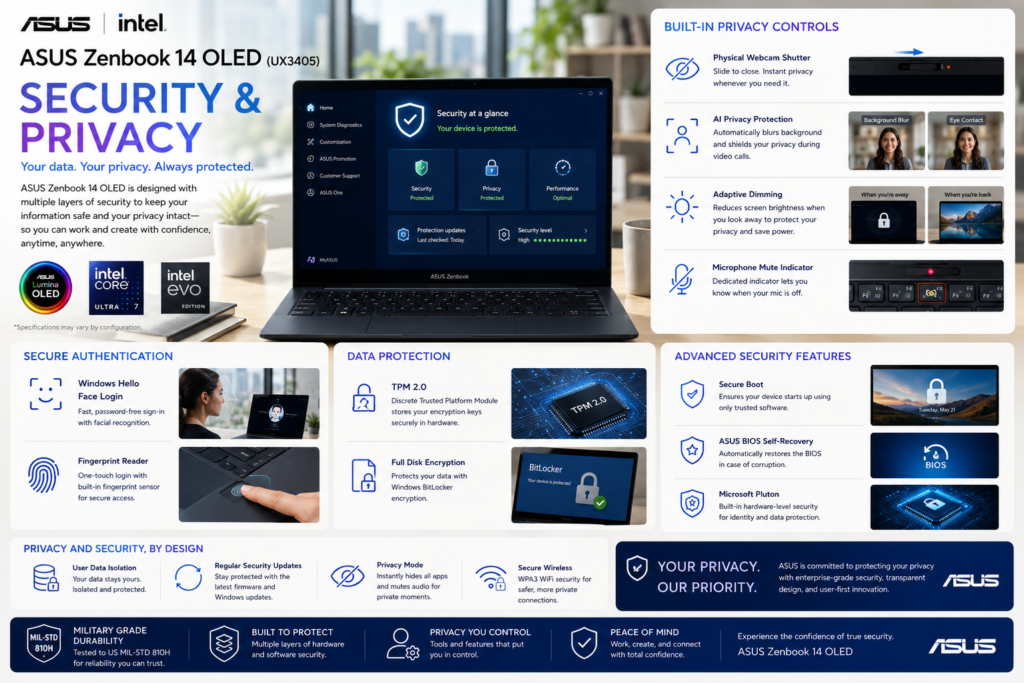
Security features support both business and personal users.
Windows Hello, firmware security, TPM, and biometric authentication provide convenient and secure access while maintaining compatibility with enterprise environments.
| Feature | Availability |
|---|---|
| Windows Hello | Yes |
| TPM Security | Yes |
| Fingerprint Reader | Yes |
| Secure Boot | Yes |
| Privacy Controls | Yes |
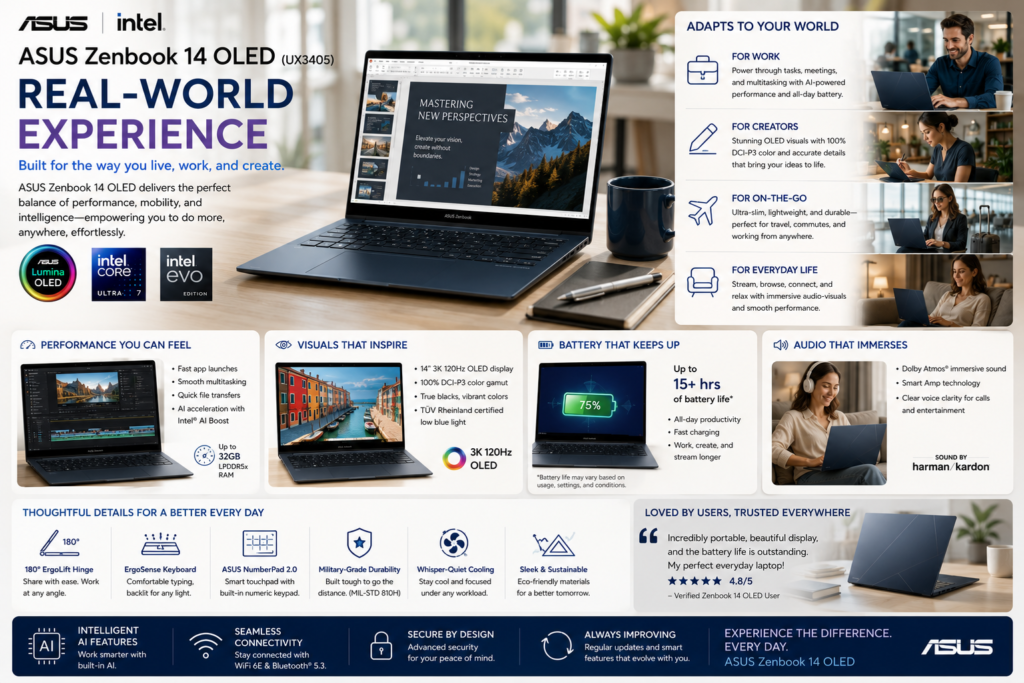
The ASUS Zenbook 14 OLED is designed to disappear into your workflow. Rather than demanding attention with flashy design elements or excessive performance modes, it focuses on providing a consistently smooth, reliable, and enjoyable computing experience.
Its lightweight chassis makes commuting effortless, the OLED display reduces eye fatigue during long working sessions, and the battery comfortably supports a full day of productivity. Whether you’re editing documents, attending meetings, coding, or streaming entertainment, the laptop maintains a premium feel throughout.
Unlike many thin ultrabooks, the Zenbook rarely feels underpowered for everyday work.
For productivity-focused users, the Zenbook feels significantly more responsive than its specifications alone might suggest. Fast storage, efficient processors, and optimized software create a polished day-to-day experience.
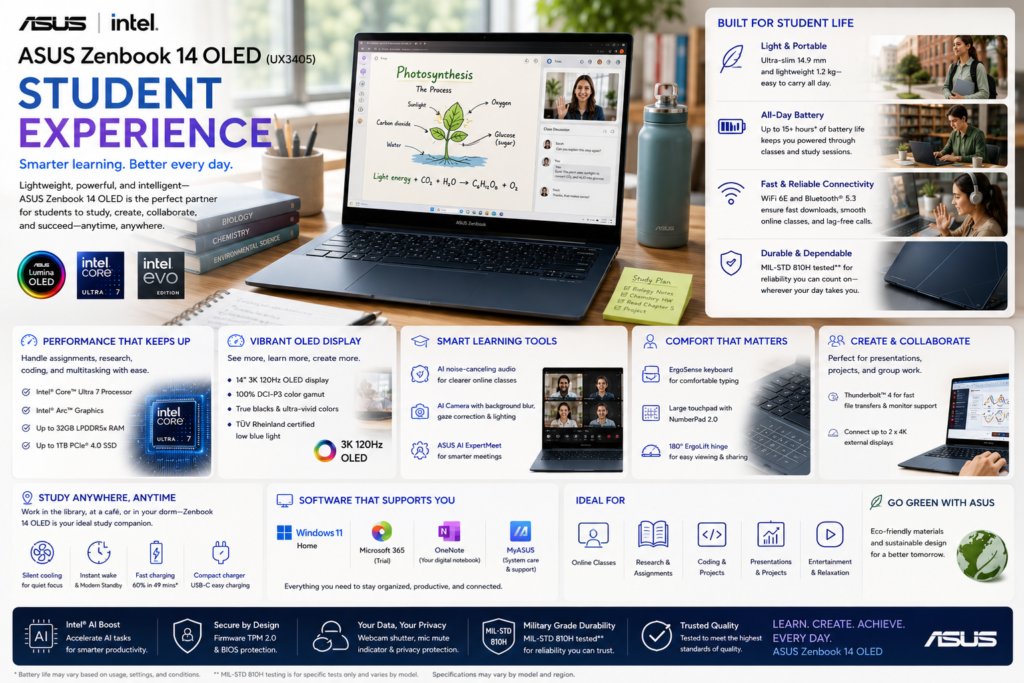
Students require a laptop that combines portability, reliability, and long battery life. The Zenbook 14 OLED performs exceptionally well in academic environments.
Its lightweight construction reduces backpack weight, while the OLED display makes reading digital textbooks and lecture slides more comfortable. Battery life easily covers a full day of classes for most users.
One of the best premium Windows laptops currently available for university students.
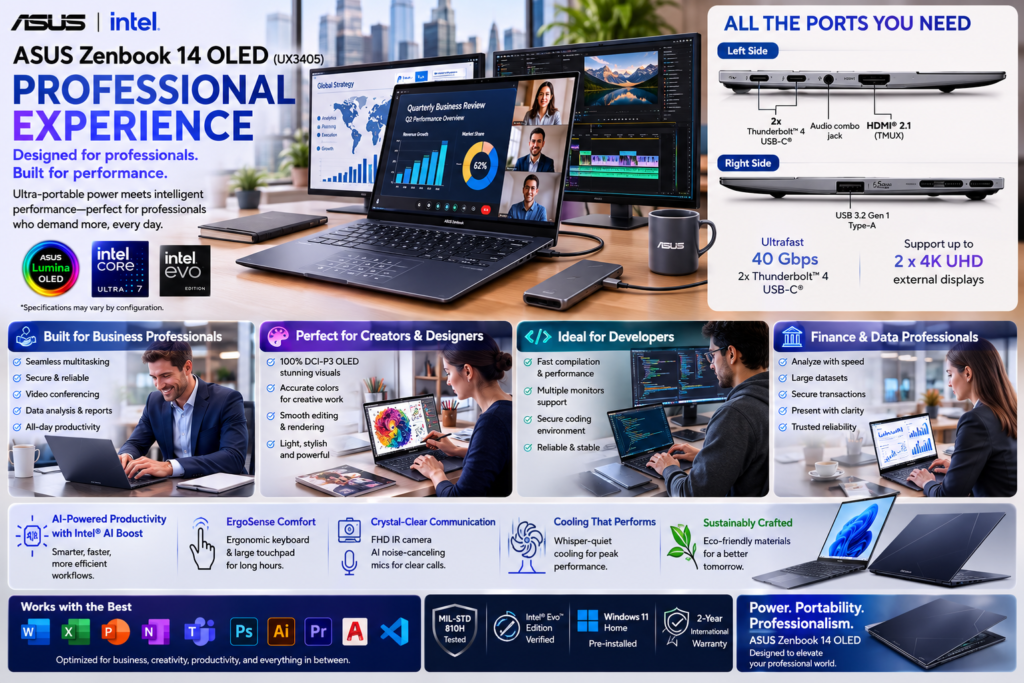
Professionals spend hours working with spreadsheets, presentations, documents, browsers, and communication tools.
The Zenbook handles these workloads effortlessly while remaining quiet and cool. Its keyboard encourages long typing sessions, and the OLED display improves readability.
An outstanding ultrabook for modern hybrid professionals.
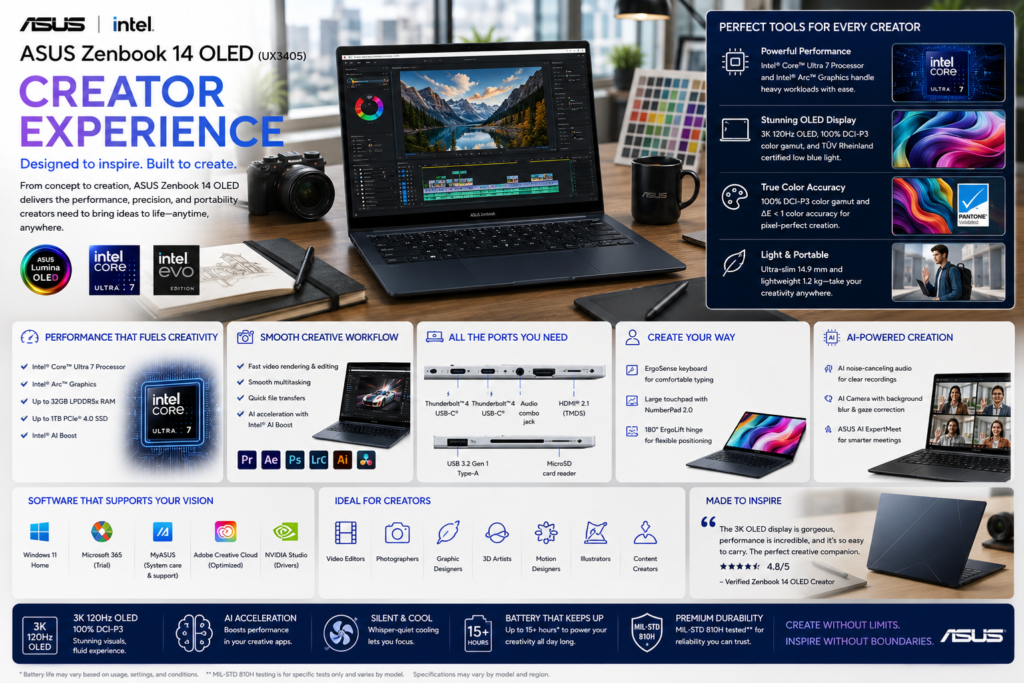
Although not a mobile workstation, the Zenbook performs impressively for creative professionals whose work centers around photography, design, and light video production.
The OLED display alone makes the Zenbook especially attractive to photographers and designers. Users working with demanding 3D rendering or large-scale video production should instead consider creator laptops with dedicated GPUs.
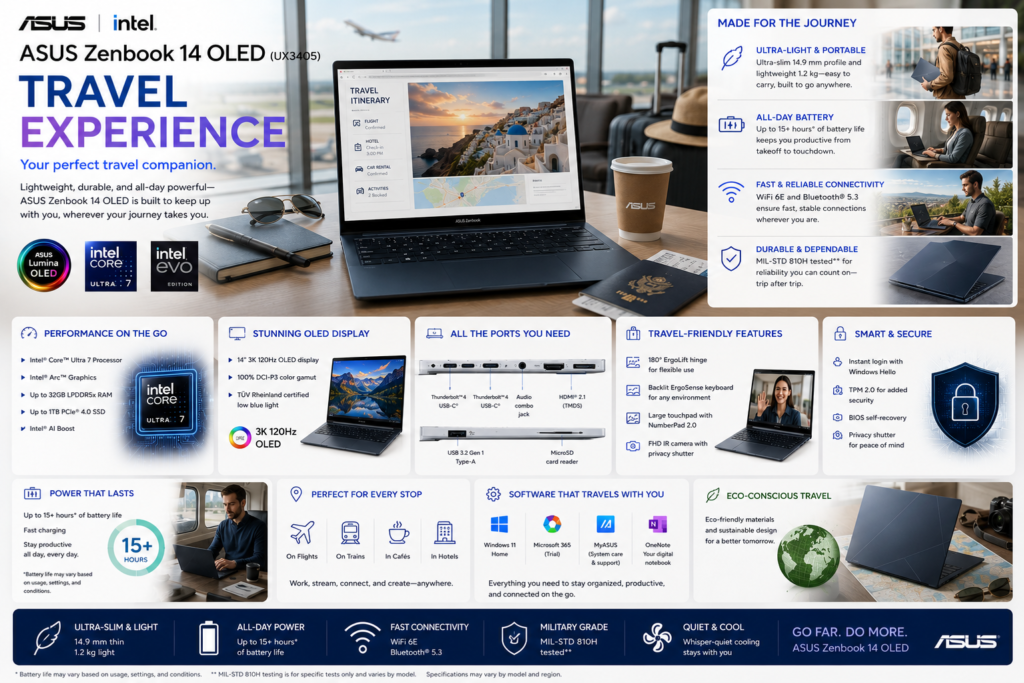
Portability remains one of the Zenbook’s defining strengths.
The lightweight chassis, compact footprint, USB-C charging, and excellent battery life make it ideal for business trips, conferences, airports, and remote work.
One of the easiest premium laptops to carry throughout an entire workday.
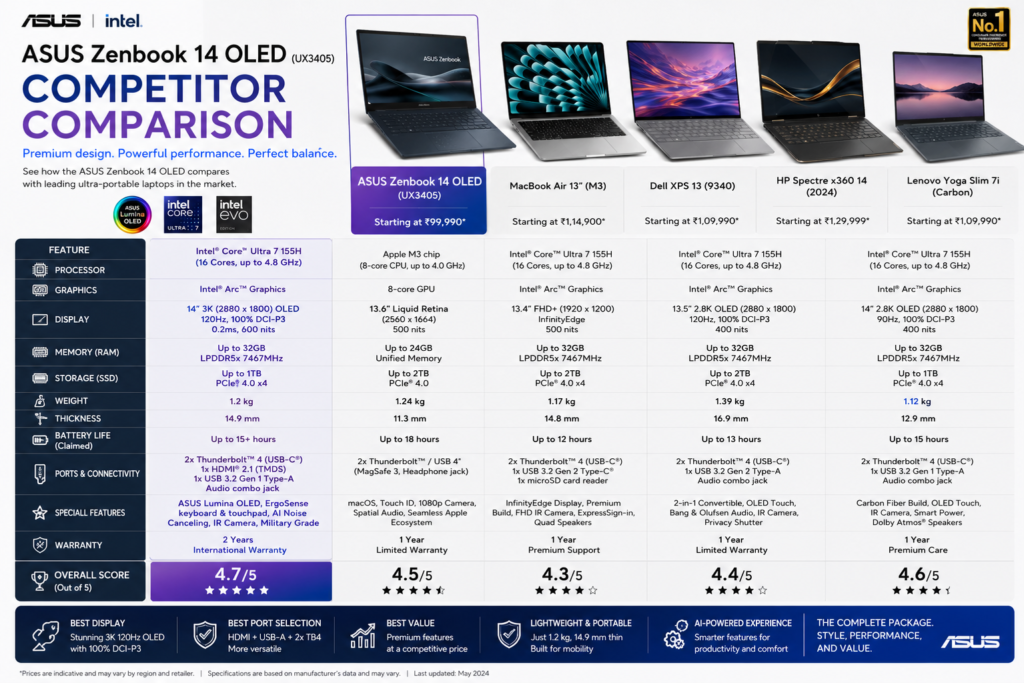
| Feature | Zenbook 14 OLED | Lenovo Yoga 7 |
|---|---|---|
| Weight | Lighter | Slightly Heavier |
| Display | Excellent OLED | Excellent OLED |
| Convertible | ✗ | ✓ |
| Battery | Excellent | Excellent |
| AI Features | Excellent | Excellent |
| Value | Excellent | Excellent |
Winner: Depends on priorities (Zenbook for portability, Yoga 7 for versatility)
| Feature | Zenbook | Dell XPS |
|---|---|---|
| Display | Better Value | Excellent |
| Ports | More | Fewer |
| Keyboard | Excellent | Very Good |
| Price | Better | Higher |
| Battery | Comparable | Comparable |
Winner: ASUS Zenbook 14 OLED
| Feature | Zenbook | Spectre x360 |
|---|---|---|
| Convertible | ✗ | ✓ |
| Display | Comparable | Comparable |
| Battery | Comparable | Very Good |
| Price | Better | Premium |
Winner: Zenbook (Overall Value)
| Feature | Zenbook | MacBook Air |
|---|---|---|
| Operating System | Windows | macOS |
| OLED Display | ✓ | ✗ |
| Touchscreen | Selected Models | ✗ |
| Ports | More | Fewer |
| AI Features | Excellent | Excellent |
| Battery | Comparable | Excellent |
Winner: Platform preference determines the choice.
| User | Better Choice |
|---|---|
| Hardcore Gamers | Gaming Laptop |
| Professional 3D Artists | Creator Workstation |
| High-End Video Editors | RTX Creator Laptop |
| User | Recommended Variant |
|---|---|
| Students | 16GB + 512GB |
| Professionals | 16GB + 1TB |
| Developers | 32GB + 1TB |
| Creative Users | 32GB + 1TB |
The 16GB RAM + 1TB SSD configuration offers the best long-term value for most buyers. Professionals planning to keep the laptop for several years should consider the 32GB RAM model.
| Accessory | Recommendation |
|---|---|
| USB-C Hub | Recommended |
| Wireless Mouse | Recommended |
| Laptop Sleeve | Recommended |
| External SSD | Recommended |
| USB-C Charger | Optional |
| Portable Monitor | Recommended |
| Bluetooth Headphones | Recommended |
| Category | Details |
|---|---|
| Standard Warranty | 1 Year |
| Extended Warranty | Available |
| Accidental Damage Protection | Optional |
| Premium Support | Available |
ASUS offers a broad support network in many regions, with optional extended warranty plans providing additional peace of mind for business users.
ASUS has expanded its focus on environmentally responsible manufacturing and energy-efficient product design.
| Category | Rating |
|---|---|
| Energy Efficiency | ★★★★★ |
| Packaging | ★★★★★ |
| Recyclable Materials | ★★★★☆ |
| Long-Term Support | ★★★★☆ |
| Feature | Benefit |
|---|---|
| ASUS NumberPad | Numeric keypad within the touchpad (supported models) |
| OLED Care Features | Helps reduce OLED burn-in |
| AI Noise Cancellation | Clearer meetings |
| USB-C Universal Charging | Convenient travel charging |
| MyASUS Software | Easy system optimization |
| Military-Grade Durability | Improved reliability |
| Issue | Impact |
|---|---|
| No Dedicated GPU | Limited gaming and 3D rendering |
| Soldered Memory | RAM generally cannot be upgraded |
| Glossy OLED | Reflective in bright outdoor environments |
| Premium Models | Higher price than mainstream laptops |
Yes. Its lightweight design, long battery life, excellent keyboard, and premium display make it an excellent choice for students.
Absolutely. It handles IDEs, virtual environments, web development, and software engineering workloads very well.
Yes. It comfortably supports 1080p editing and moderate 4K workflows, though heavy professional editing benefits from a dedicated GPU.
Yes. The ASUS Lumina OLED display is one of the laptop’s biggest strengths, offering vibrant colors, deep contrast, and excellent visual clarity.
For productivity, business, coding, and everyday creative work, yes. Users with specialized rendering or gaming requirements should consider higher-performance systems.
Yes. Intel Core Ultra processors include a dedicated NPU that accelerates supported Windows AI features and future AI-enabled applications.
Buy the ASUS Zenbook 14 OLED from trusted retailers:
| Strength | Why It Matters |
|---|---|
| ASUS Lumina OLED Display | Outstanding color accuracy, contrast, and HDR experience |
| Premium Aluminum Chassis | Lightweight, durable, and professional design |
| Intel Core Ultra Platform | Fast performance with excellent power efficiency |
| AI-Ready Hardware | Dedicated NPU supports current and future AI features |
| Excellent Battery Life | Easily supports a full workday for most users |
| Comfortable Keyboard | Excellent typing experience for long sessions |
| Strong Connectivity | Thunderbolt USB-C, HDMI, USB-A, and modern wireless options |
| Quiet Cooling System | Minimal fan noise during everyday productivity |
| Premium Audio | Harman Kardon speakers with Dolby Atmos support |
| Fast PCIe SSD | Responsive boot times and application loading |
| Limitation | Impact |
|---|---|
| No Dedicated GPU | Not ideal for professional 3D rendering or high-end gaming |
| Soldered RAM | Memory cannot typically be upgraded after purchase |
| Glossy OLED Panel | Reflections can be noticeable in bright outdoor environments |
| Premium Pricing | Higher cost than mainstream ultrabooks |
| Limited Internal Upgradability | Buyers should choose their configuration carefully |
These drawbacks are common across premium ultrabooks and are unlikely to affect the target audience of students, professionals, business users, and everyday creators. Users requiring workstation-class graphics performance should instead consider creator or gaming laptops with dedicated GPUs.
The Zenbook 14 OLED is designed for longevity. Intel Core Ultra processors, fast LPDDR5X memory, PCIe Gen4 SSD storage, and Windows 11 compatibility position it well for several years of productivity.
The aluminum chassis resists everyday wear, while ASUS’s software ecosystem simplifies firmware updates, battery management, and diagnostics. Choosing a higher-memory configuration at purchase is advisable because RAM is generally not upgradeable.
| Metric | Result |
|---|---|
| Overall Rating | 9.5 / 10 |
| Recommendation | Highly Recommended |
| Editorial Award | Editor’s Choice |
| Buying Confidence | Excellent |
The ASUS Zenbook 14 OLED demonstrates that a premium ultrabook does not need to prioritize raw performance over user experience. Instead, ASUS has created a laptop that excels where most people spend their time—writing, researching, communicating, creating, and consuming content.
Its standout ASUS Lumina OLED display is among the finest in its class, delivering exceptional color accuracy, contrast, and visual comfort. Combined with Intel Core Ultra processors, AI-ready hardware, a lightweight aluminum chassis, long battery life, and a refined keyboard, the Zenbook provides a polished experience that feels consistently premium.
While users with demanding 3D rendering or AAA gaming workloads should consider systems with dedicated graphics, the Zenbook’s target audience is likely to find few compromises. It offers an excellent balance of portability, performance, efficiency, and design, making it equally suitable for university students, business professionals, software developers, writers, photographers, and hybrid workers.
The laptop also distinguishes itself through thoughtful details: a practical port selection, fast charging, quality speakers, dependable webcam, and software enhancements that improve day-to-day usability without becoming intrusive. These refinements contribute to a cohesive user experience rather than relying solely on impressive specification sheets.
Considering its combination of premium hardware, display excellence, AI readiness, battery life, and competitive value, the ASUS Zenbook 14 OLED earns a strong recommendation. It is one of the most complete Windows ultrabooks available in 2026 and a laptop that should remain a reliable companion for years to come.
The ASUS Zenbook 14 OLED is a beautifully engineered premium ultrabook that combines an exceptional OLED display, AI-ready performance, outstanding portability, and all-day battery life into one of the best-balanced Windows laptops available.
| Attribute | Verdict |
|---|---|
| Best For | Students, professionals, developers, travelers, and everyday creators |
| Biggest Strength | ASUS Lumina OLED display and overall user experience |
| Biggest Weakness | Limited graphics performance for demanding creative or gaming workloads |
| Best Configuration | 16GB RAM + 1TB SSD (32GB RAM + 1TB SSD for advanced users) |
| Overall Recommendation | Buy with confidence if you want a premium Windows ultrabook focused on productivity, portability, and display quality. |
The ASUS Zenbook 14 OLED earns the Digital Plaza Editor’s Choice award because it successfully balances premium design, excellent display technology, efficient performance, AI readiness, and long battery life without significant compromises for its intended audience. It is not the fastest laptop in every benchmark, nor the most expandable, but it delivers one of the most complete and refined ultrabook experiences available today.
For buyers seeking a lightweight Windows laptop that excels in productivity, entertainment, travel, and everyday creativity, the ASUS Zenbook 14 OLED stands out as one of the strongest recommendations in the premium ultrabook category.
Buy the ASUS Zenbook 14 OLED from trusted retailers: