Meta Description
Understand how LCD backlight technology creates and controls the light behind modern displays. Explore the evolution from CCFL and conventional LED backlighting to edge-lit, direct-lit, FALD, full-array local dimming and Mini-LED systems. Learn how backlight zones affect brightness, contrast, HDR, black levels, blooming, haloing, uniformity, power consumption and color, why Mini-LED is different from MicroLED, and how advanced backlighting is used in smartphones, tablets, laptops, monitors and TVs.
In One Sentence
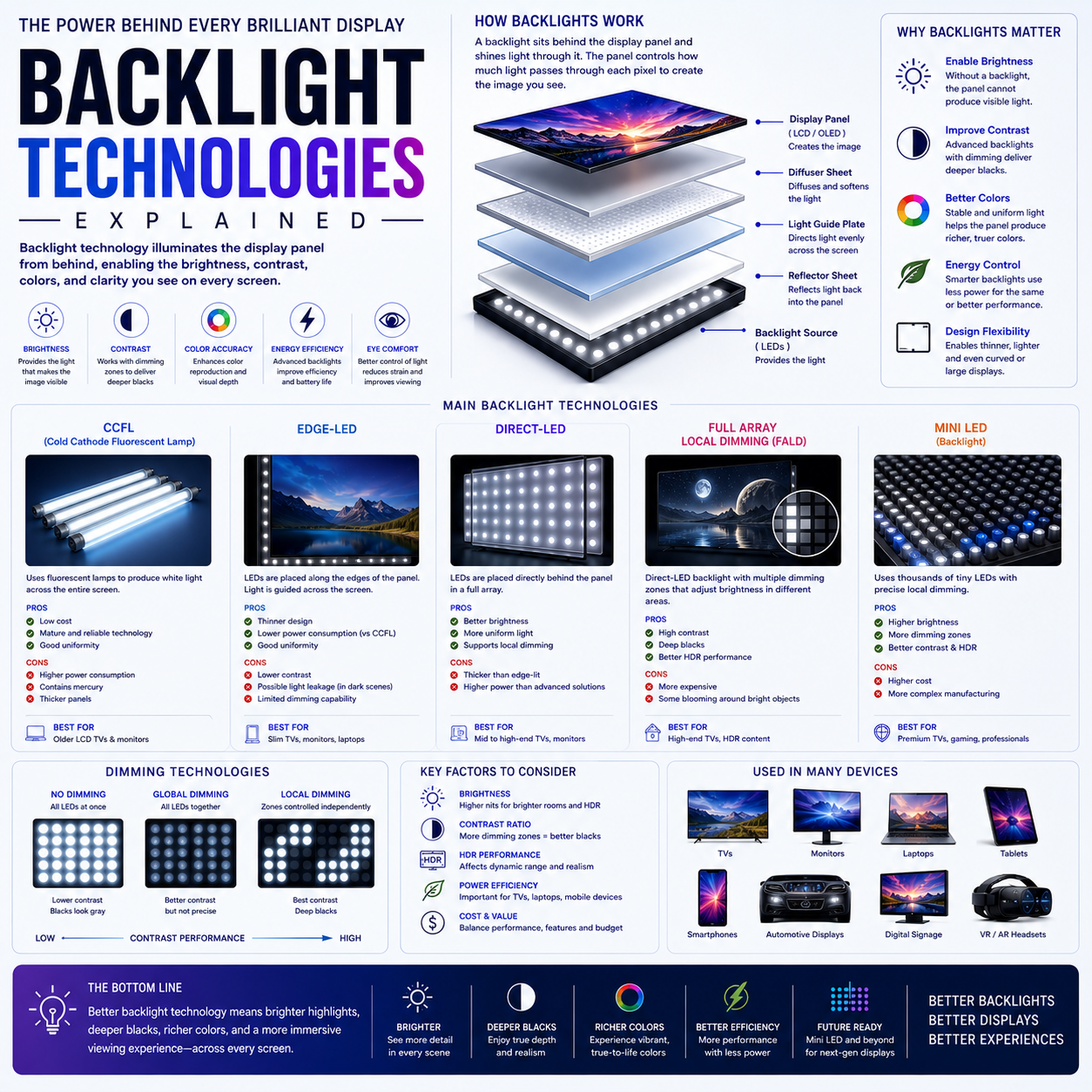
An LCD cannot produce light by itself, so its backlight system provides and controls the illumination behind the panel, with technologies evolving from CCFL to LED, edge-lit, direct-lit, FALD and Mini-LED to improve brightness, contrast, HDR performance, efficiency and uniformity.
Introduction: The Light Behind the LCD
In the previous article, we explored emissive display technologies such as OLED, QD-OLED and MicroLED.
Those technologies can generate light at the pixel level.
LCD works differently.
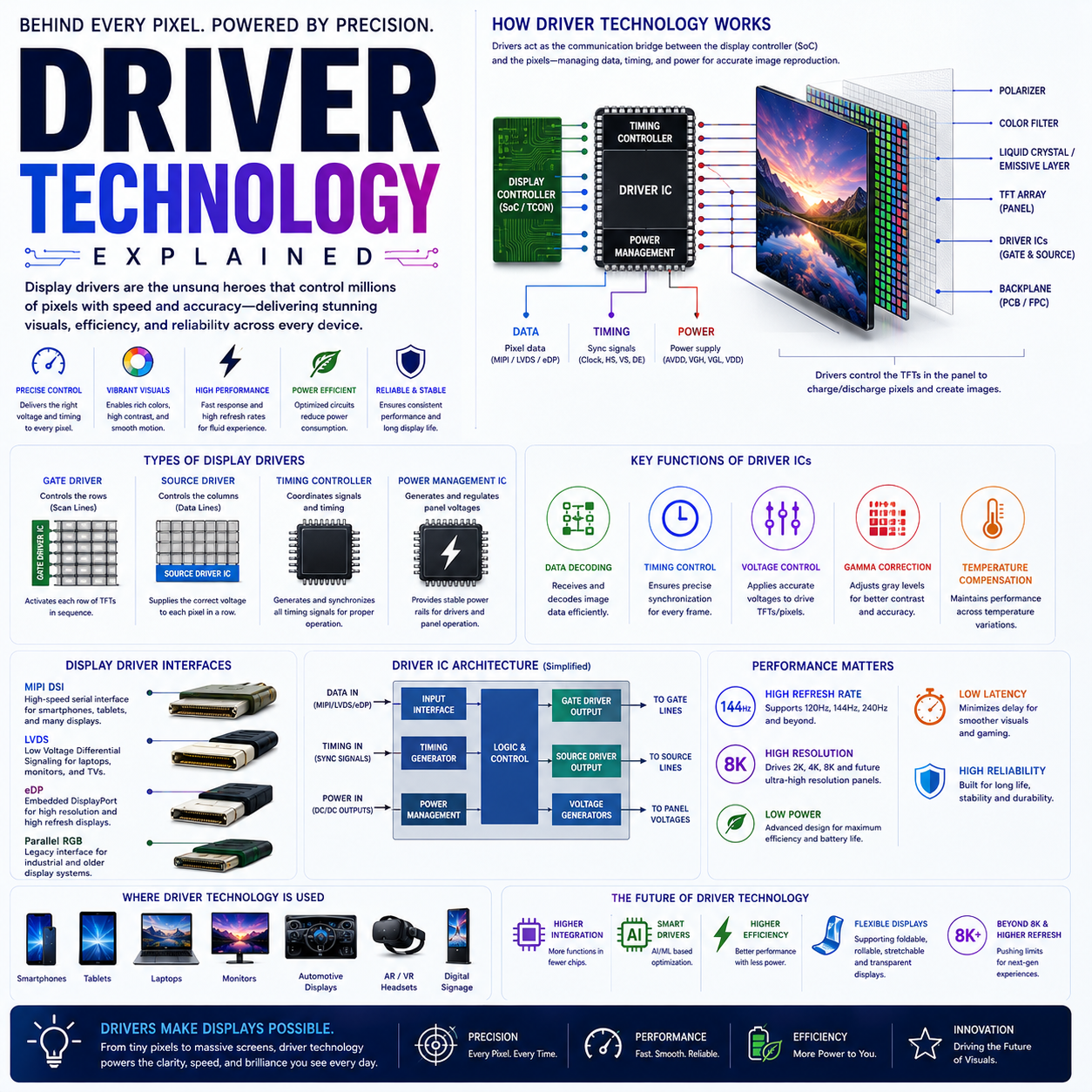
An LCD pixel does not normally produce its own light.
Instead, it controls light supplied by a separate illumination system:
The backlight.
The basic architecture is:
BACKLIGHT
    ↓
Optical System
    ↓
LCD Panel
    ↓
Color Filter
    ↓
Visible Image
This seemingly simple light source has become a sophisticated engineering system.
Modern LCD displays may contain:
- hundreds or thousands of LEDs
- optical films
- light guides
- diffusers
- reflectors
- local-dimming zones
- Mini-LED arrays
- sophisticated control algorithms
The backlight therefore has a major influence on the final display.
1. What Is a Backlight?
A backlight is the illumination system positioned behind—or around—the image-forming layer of a display.
Its job is to provide the light that the LCD panel modulates.
In simplified form:
Light Source
     ↓
Optical Management
     ↓
LCD
     ↓
Color
     ↓
Image
The LCD controls how much of that illumination reaches the viewer.
This means an LCD display is effectively a combination of:
light source + optical system + light modulator.
2. Why LCD Needs a Backlight
Liquid crystals do not normally generate visible light.
Instead, their orientation changes how light passes through the panel.
The system therefore needs an external light source.
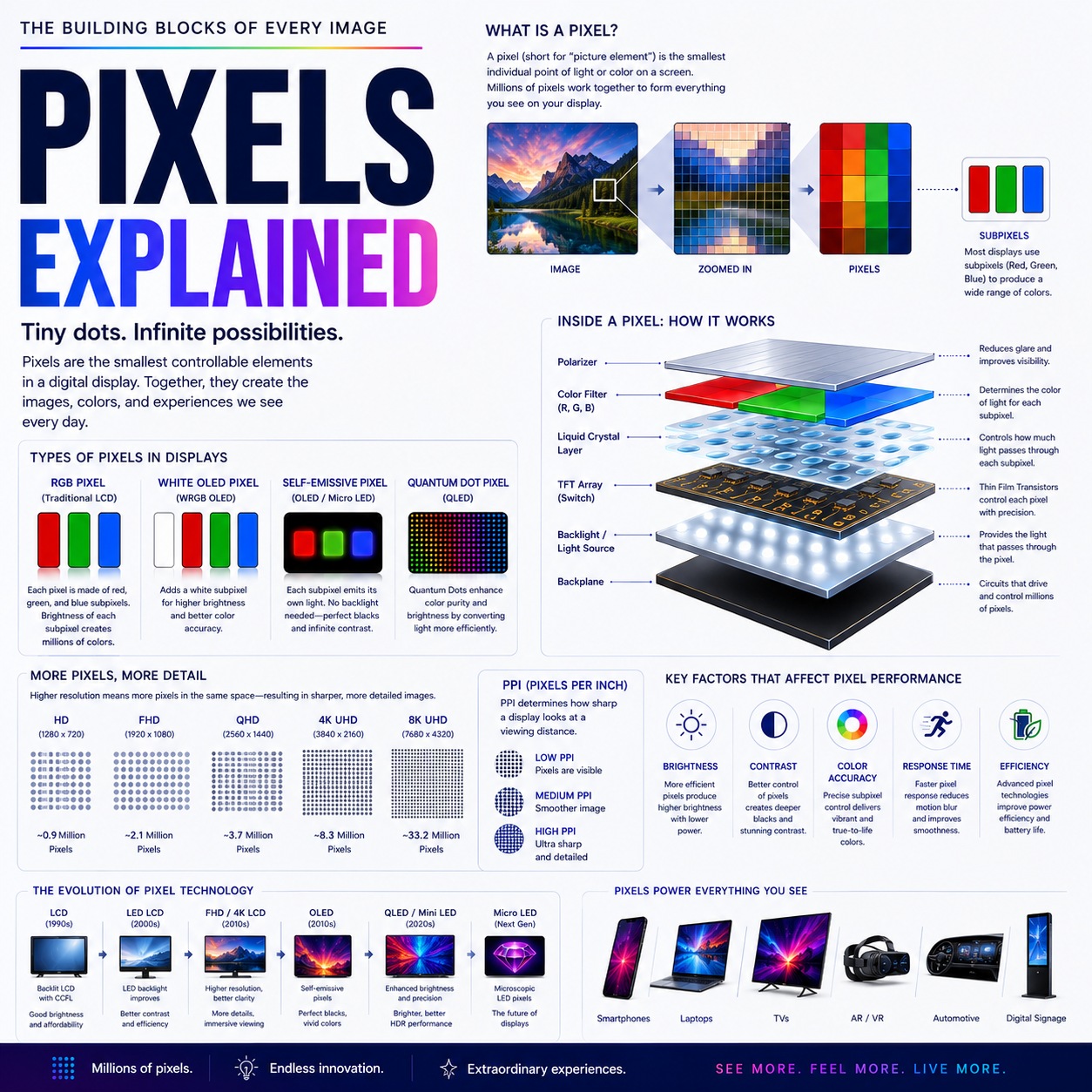
A simplified LCD pixel can be represented as:
Backlight
   ↓
Polarizer
   ↓
Liquid Crystal
   ↓
Color Filter
   ↓
Viewer
The transistor-controlled liquid-crystal layer changes light transmission.
The backlight provides the photons.
This distinction is fundamental:
LCD controls light; the backlight creates it.
3. The Original LCD Backlight: CCFL
Before LEDs became dominant, many LCD displays used:
CCFL — Cold-Cathode Fluorescent Lamps.
These were miniature fluorescent tubes positioned behind the LCD panel.
Conceptually:
CCFL Tubes
────────────
────────────
────────────
     ↓
LCD Panel
CCFL systems were widely used in:
- older televisions
- desktop monitors
- laptops
- professional displays
Advantages
- mature technology
- relatively uniform illumination
- established manufacturing
Limitations
- thicker displays
- greater power consumption
- less flexible dimming
- more heat
- mercury-containing fluorescent technology
- limited suitability for modern local dimming
The industry eventually moved toward LED illumination.
4. LED Backlighting
The transition from CCFL to LED transformed LCD design.
LEDs offered:
- smaller size
- lower power potential
- longer operating life
- better controllability
- thinner designs
- easier integration into compact devices
This enabled manufacturers to place LEDs in different physical arrangements.
The two major approaches became:
Edge-lit
and
Direct-lit / backlit.
5. Edge-Lit LED
In an edge-lit LCD, LEDs are positioned around the edges of the display.
A light guide spreads that illumination across the panel.
Simplified:
LED → → → → → LED
│               │
│   LCD PANEL   │
│               │
LED → → → → → LED
The light is distributed through an optical light-guide structure.
Why edge lighting became popular
It enabled:
- very thin displays
- relatively simple construction
- lower manufacturing cost
- compact televisions
- thin laptops and monitors
Edge-lit systems remain useful where thickness and cost are important.
6. The Problem With Edge Lighting
The LEDs are not positioned directly behind every part of the display.
Therefore, achieving perfectly uniform illumination across a large panel can be challenging.
Potential issues include:
- brightness variation
- corner illumination differences
- clouding
- uneven black levels
- limited local-dimming capability
This becomes increasingly important as displays become larger and HDR becomes more demanding.
7. Direct-Lit LED
In a direct-lit configuration, LEDs are positioned behind the LCD panel rather than only around its edges.
Conceptually:
●   ●   ●   ●
  ●   ●   ●
●   ●   ●   ●
  ●   ●   ●

       ↓

     LCD
The LEDs illuminate the panel from behind.
Advantages
- potentially better uniformity
- simpler optical path
- easier implementation of backlight arrays
Limitation
A basic direct-lit system may still treat the entire backlight as one large illumination source.
In that case, it does not provide sophisticated local dimming.
8. Global Dimming
The simplest control strategy is:
Turn the entire backlight up or down.
For a bright scene:
100% Backlight
For a dark scene:
20% Backlight
But the whole panel changes together.
That means a scene containing:
creates a problem.
The backlight must remain bright enough for the moon while the LCD attempts to block the light in the surrounding black area.
Some light still leaks through.
The result is limited contrast.
9. Local Dimming
Local dimming solves this problem by dividing the backlight into independently controlled zones.
Instead of:
ONE BACKLIGHT
the display uses:
MULTIPLE BACKLIGHT ZONES
Conceptually:
┌─────┬─────┬─────┬─────┐
│  1  │  2  │  3  │  4  │
├─────┼─────┼─────┼─────┤
│  5  │  6  │  7  │  8  │
├─────┼─────┼─────┼─────┤
│  9  │ 10  │ 11  │ 12  │
└─────┴─────┴─────┴─────┘
The system can brighten some zones and dim others.
This can dramatically improve contrast.
10. Full-Array Local Dimming — FALD
FALD stands for:
Full-Array Local Dimming.
Instead of placing LEDs only around the edge, a large array of LEDs is positioned behind the LCD panel.
The array is divided into independently controlled zones.
Conceptually:
LED LED LED LED LED
LED LED LED LED LED
LED LED LED LED LED
LED LED LED LED LED
        ↓
       LCD
Each group of LEDs forms a dimming zone.
Why FALD matters
It enables:
- better black levels
- higher contrast
- improved HDR
- brighter highlights
- more localized illumination
FALD represented a major improvement over basic edge-lit LCD systems.
11. LED Zones vs Pixels
This distinction is essential.
A local-dimming zone can contain:
Thousands of LCD pixels.
For example:
ONE BACKLIGHT ZONE
┌─────────────────┐
│ • • • • • • • • │
│ • • • • • • • • │
│ • • • • • • • • │
│ • • • • • • • • │
└─────────────────┘
Each dot represents an LCD pixel.
The backlight zone controls them collectively.
An OLED pixel, by contrast, can control its own light emission.
Therefore:
Local dimming ≠ pixel-level dimming.
12. Why Local Dimming Improves Contrast
Consider a dark image with one bright object.
Without local dimming:
████████████████
██████ WHITE ███
████████████████
The backlight must illuminate the whole area.
With local dimming:
Dim   Dim   Dim
Dim   BRIGHT Dim
Dim   Dim   Dim
The system can reduce illumination in dark regions while keeping the bright zone illuminated.
This produces much better effective contrast.
13. Blooming
Local dimming has a fundamental limitation.
Suppose a tiny white object is displayed against a black background.
The backlight zone containing the object must illuminate an area larger than the object itself.
That can create a visible halo.
This is called:
Blooming
or:
Haloing
Conceptually:
      Bright object
          ●
       ○○○○○
     ○       ○
The surrounding dark region becomes slightly illuminated.
The more zones a display has—and the more precisely it can control them—the more effectively this problem can be reduced.
But it cannot be completely eliminated while the backlight remains zone-based.
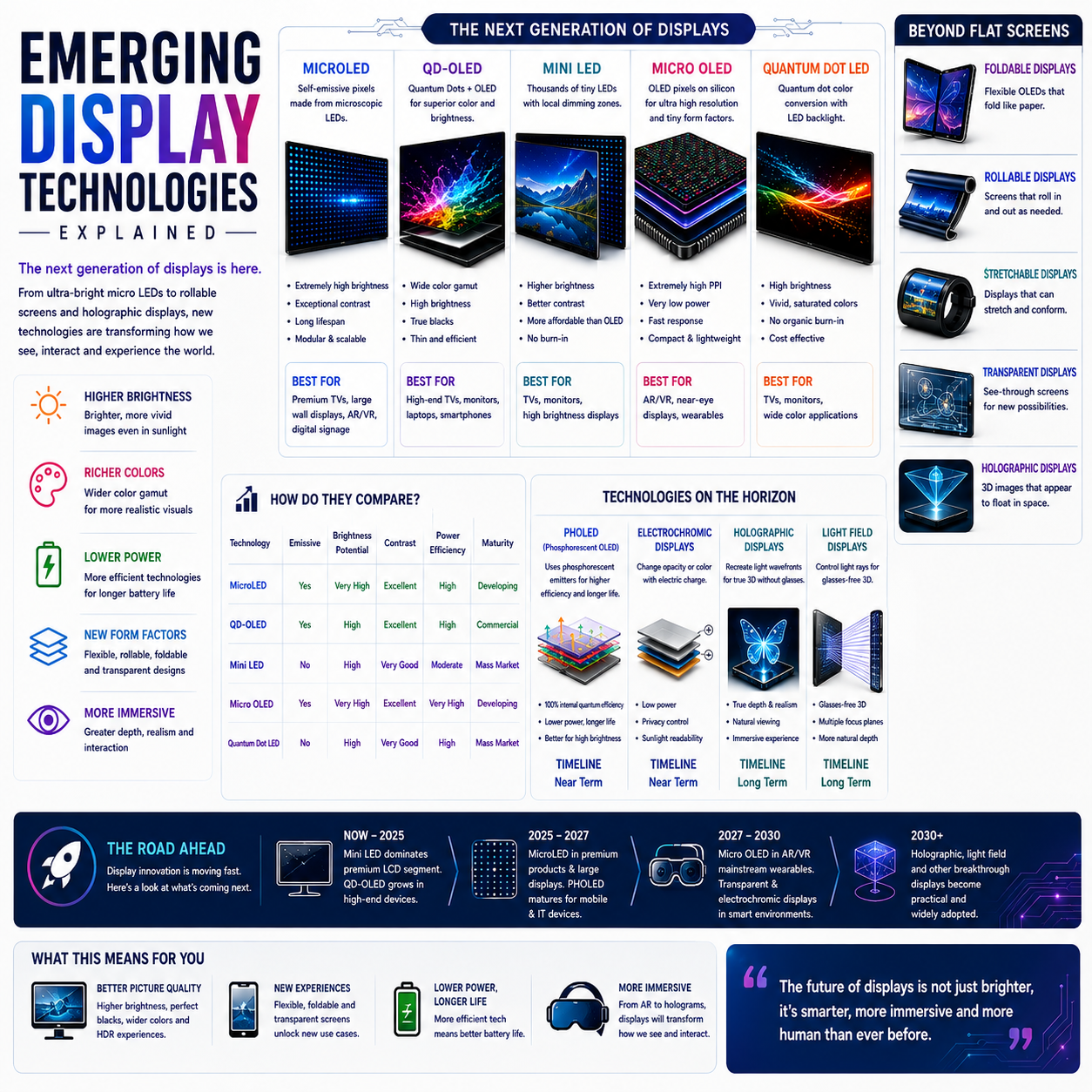
14. Mini-LED
Mini-LED is one of the most important developments in LCD backlighting.
The basic concept is:
Use much smaller LEDs and many more of them.
Instead of a relatively small number of larger LEDs, Mini-LED systems can use a very large number of tiny LEDs.
Conceptually:
● ● ● ● ● ● ● ● ● ●
● ● ● ● ● ● ● ● ● ●
● ● ● ● ● ● ● ● ● ●
● ● ● ● ● ● ● ● ● ●
● ● ● ● ● ● ● ● ● ●
These can be organized into many independently controlled zones.
15. Why Mini-LED Is Important
Mini-LED can improve LCD performance in several areas.
More local-dimming zones
Smaller LEDs make finer backlight segmentation practical.
Higher brightness
A large number of LEDs can provide substantial illumination.
Better HDR
Bright highlights can be illuminated while dark regions are dimmed.
Better contrast
More precise control can reduce unwanted illumination.
Thin designs
Mini-LED systems can be integrated into relatively compact products.
This is why Mini-LED became particularly important in:
- premium laptops
- tablets
- monitors
- televisions
16. Mini-LED Is Not MicroLED
This distinction must be repeated because it is one of the industry’s most common sources of confusion.
Mini-LED
Mini-LED
   ↓
Backlight
   ↓
LCD
   ↓
Image
The LEDs illuminate the LCD.
MicroLED
MicroLED
   ↓
Individual LED Pixels
   ↓
Image
The microscopic LEDs themselves are the image-forming pixels.
Therefore:
Mini-LED improves LCD backlighting. MicroLED replaces the LCD light-modulation architecture with self-emissive LED pixels.
They are fundamentally different technologies.
17. Mini-LED vs OLED
This comparison is particularly useful.
Mini-LED LCD
Strengths
- very high brightness potential
- strong HDR
- no OLED organic-emitter aging mechanism
- large-screen scalability
- good performance in bright environments
Limitations
- zone-based dimming
- blooming
- LCD viewing characteristics
- backlight complexity
OLED
Strengths
- pixel-level light control
- extremely deep blacks
- excellent contrast
- very fast response
- thin construction
Limitations
- organic-material aging
- burn-in/image-retention considerations
- brightness/lifetime trade-offs
- manufacturing cost
Neither is universally better.
The right choice depends on the application.
18. Backlight and HDR
HDR is one of the biggest reasons backlight technology matters.
HDR content may contain:
- extremely dark regions
- very bright highlights
- simultaneous bright and dark elements
A simple LCD backlight struggles because it illuminates too much of the panel at once.
Local dimming improves this.
FALD improves it further.
Mini-LED can provide much finer control.
The progression is approximately:
Basic LCD
   ↓
Edge-lit
   ↓
Direct-lit
   ↓
FALD
   ↓
Mini-LED
   ↓
More precise local dimming
But the final HDR experience also depends on:
- panel contrast
- peak brightness
- tone mapping
- image processing
- color volume
- thermal management
19. Peak Brightness vs Sustained Brightness
A display may advertise an extremely high peak brightness.
But that does not necessarily mean it can maintain that brightness across the entire screen indefinitely.
Thermal and electrical constraints matter.
Peak brightness
Maximum brightness under specified conditions, often for a limited area or duration.
Sustained brightness
Brightness that can be maintained over a longer period or larger portion of the screen.
This distinction is particularly important for:
- HDR
- outdoor displays
- professional monitors
- televisions
- laptops
Backlight systems must balance brightness with:
- heat
- power
- component lifetime
20. Backlight Power Consumption
LED backlights can consume significant power.
The major factors include:
- LED efficiency
- number of LEDs
- brightness
- screen size
- local-dimming behavior
- content
- optical efficiency
A brighter display generally requires more electrical energy.
Local dimming can help because dark areas can receive less illumination.
This creates another important principle:
Good backlight design is not simply about producing more light; it is about producing the right amount of light in the right places.
21. Backlight Uniformity
A good display should appear uniformly illuminated.
In an ideal panel:
Brightness
████████████
████████████
████████████
████████████
In a problematic panel, certain regions may appear brighter or darker.
Possible causes include:
- LED placement
- optical films
- diffuser performance
- panel tolerances
- mechanical pressure
- assembly variation
Uniformity is particularly important for:
- professional monitors
- photography
- video production
- large televisions
22. Backlight Bleeding
Backlight bleed refers to unwanted light appearing around the edges or through areas that should appear dark.
It is generally associated with LCD construction and can vary substantially between individual panels.
It can be particularly noticeable in:
- dark rooms
- black images
- widescreen movies
Backlight bleed should not be confused with blooming.
Backlight bleed
A panel/assembly characteristic involving unwanted light leakage.
Blooming
A local-dimming artifact caused by illumination spreading beyond the intended bright region.
They have different causes.
23. Clouding and Mura
Large LCD panels can also exhibit broader brightness non-uniformity.
Terms such as:
- clouding
- mura
- luminance non-uniformity
describe different forms of spatial variation.
These issues can result from:
- manufacturing variation
- optical-layer differences
- mechanical stress
- LED distribution
High-end panel manufacturing attempts to minimize these effects.
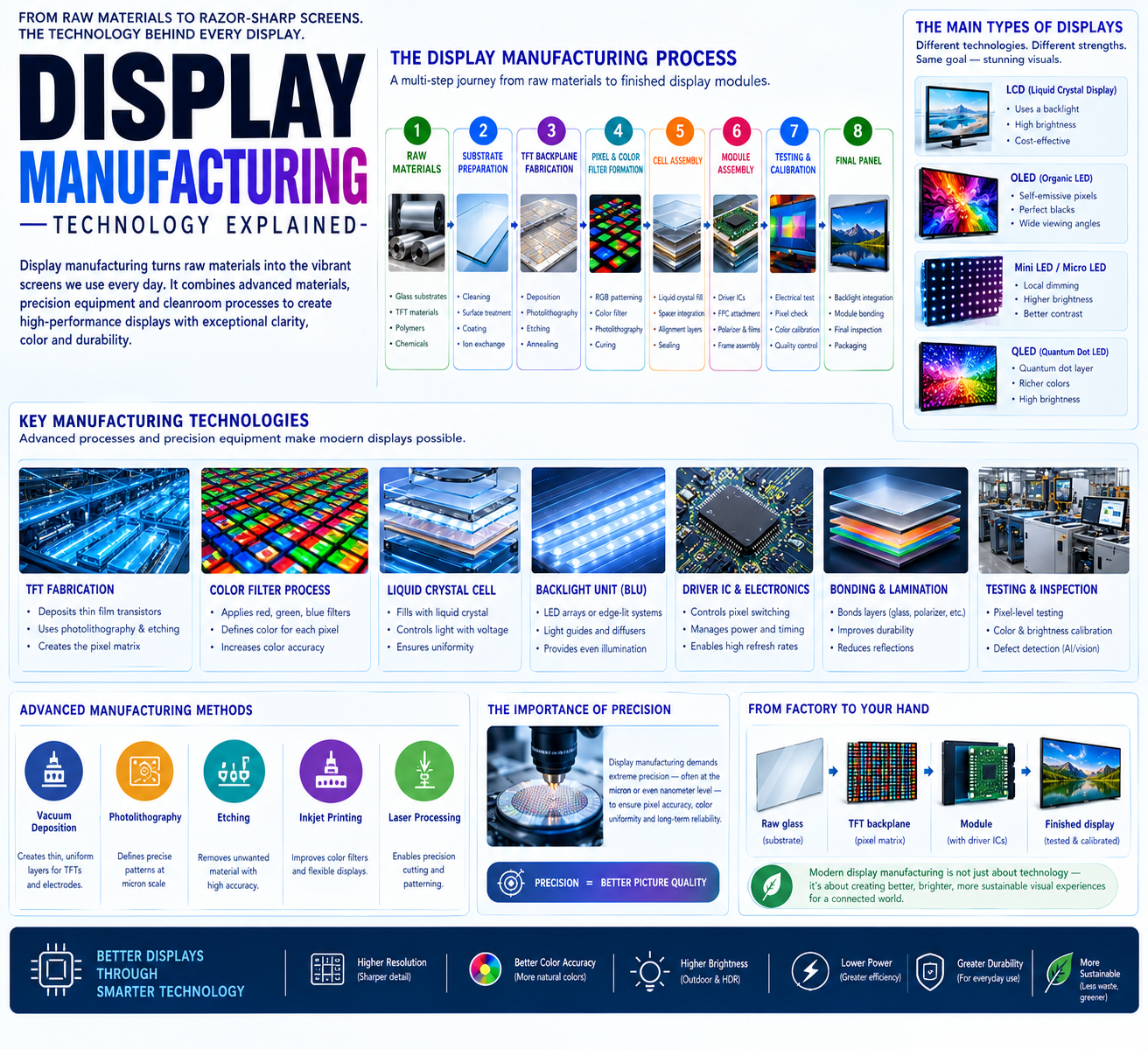
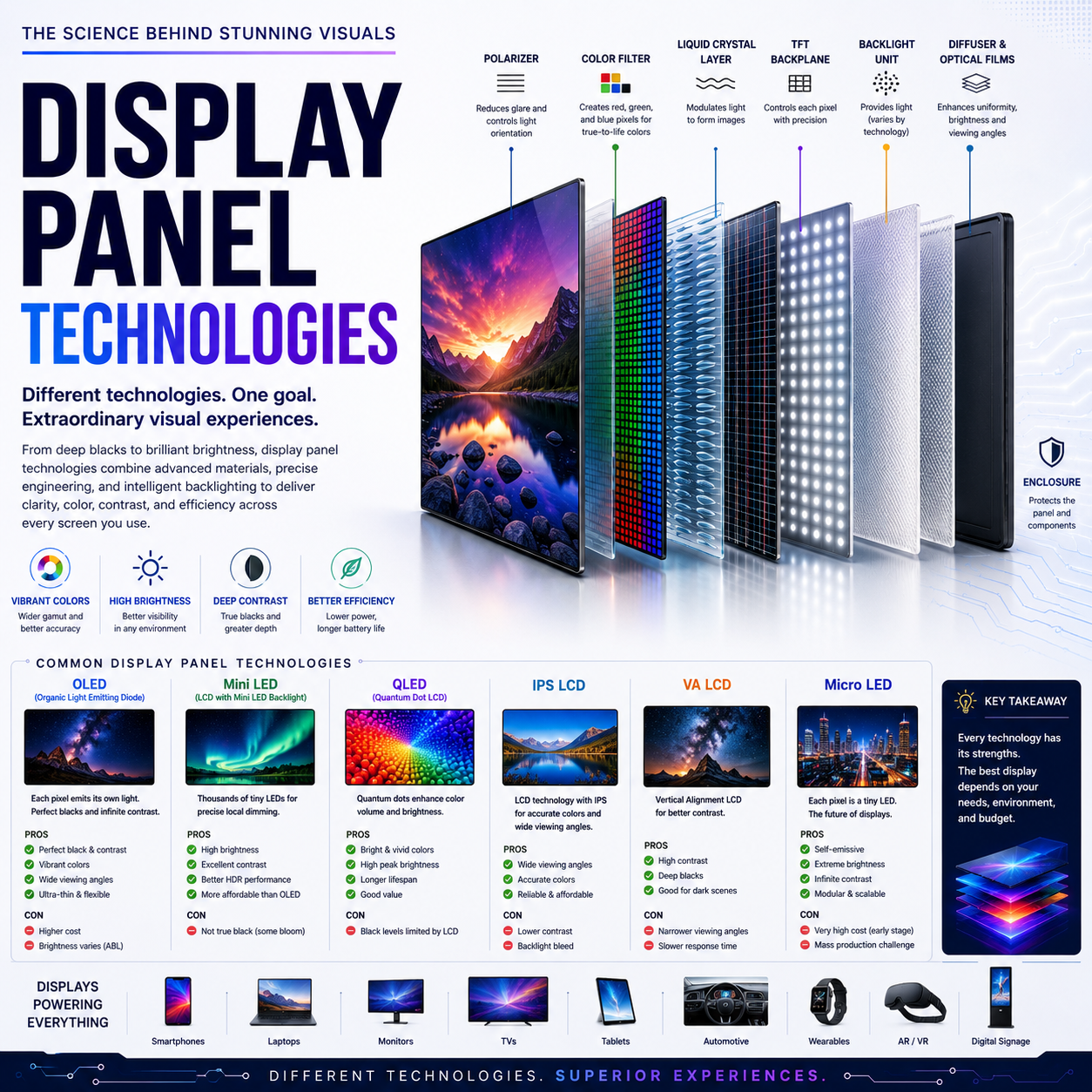
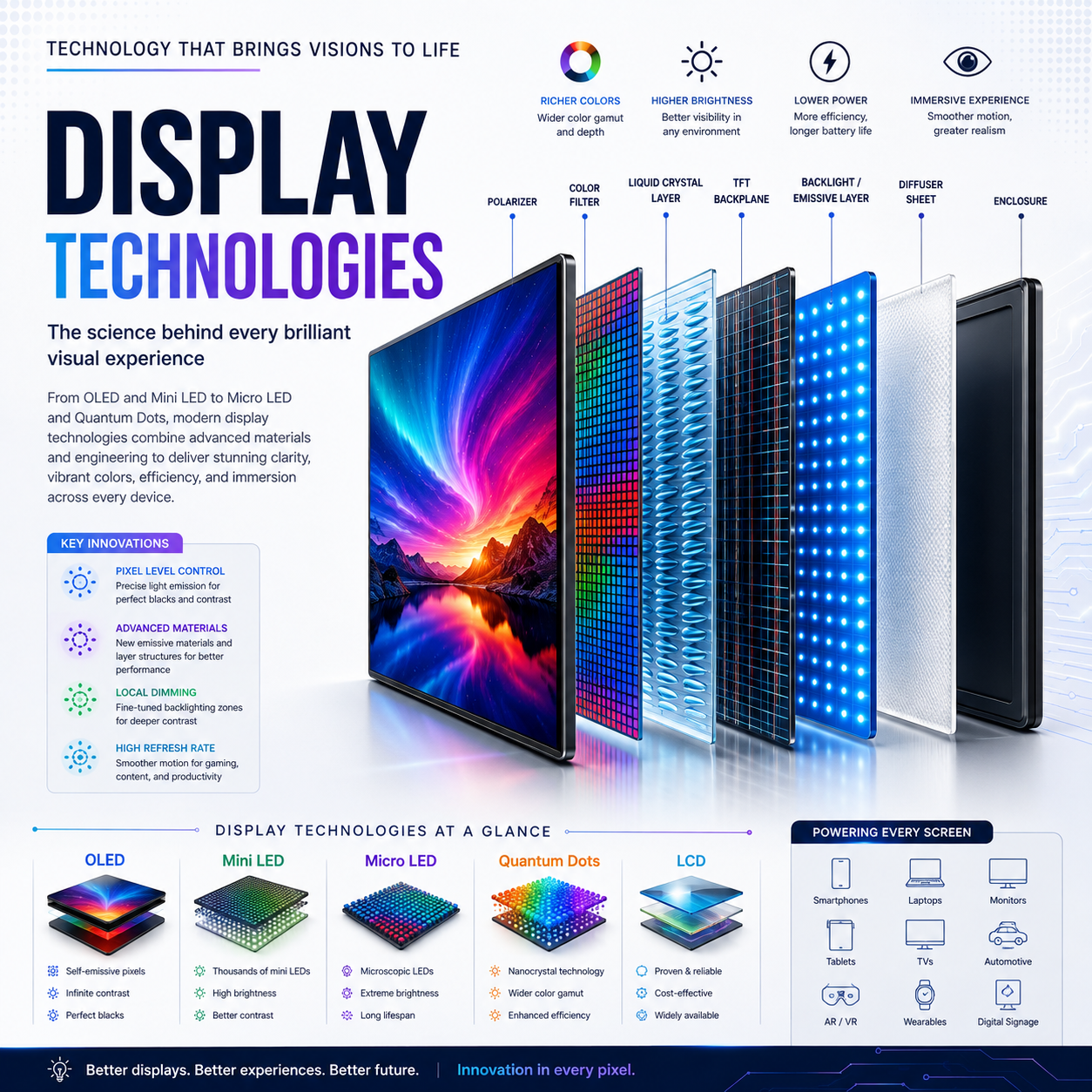
24. The Optical Stack
The backlight is not simply:
LED → LCD
There is usually a complex optical system between the light source and panel.
It can include:
- reflector
- light guide plate
- diffuser
- prism films
- brightness-enhancement films
- optical sheets
A simplified structure:
LED
 ↓
Reflector
 ↓
Light Guide / Diffuser
 ↓
Optical Films
 ↓
LCD
 ↓
Color Filter
 ↓
Viewer
These layers help:
- distribute light
- improve uniformity
- direct light toward the viewer
- increase apparent brightness
- control optical efficiency
25. Edge-Lit vs Direct-Lit vs FALD vs Mini-LED
| Technology | LED location | Local dimming | Major advantage | Main limitation |
|---|
| Edge-lit | Display edges | Limited/none | Thinness | Less precise illumination |
| Direct-lit | Behind panel | Usually limited | Simple, potentially uniform | Limited contrast control |
| FALD | Behind panel | Yes | Better HDR and contrast | Blooming / thickness |
| Mini-LED | Behind panel | Many zones | Brightness + fine local control | Cost / blooming |
The important progression is not merely “newer is better.”
Each approach represents a different balance of:
cost + thickness + brightness + control + manufacturing complexity.
26. Backlight Technology in Different Devices
Smartphones
Traditional LCD smartphones generally use compact LED backlighting.
OLED dominates premium smartphone displays, meaning the display itself is emissive and does not require an LCD backlight.
Tablets
Tablets may use:
- conventional LED LCD
- Mini-LED LCD
- OLED
Mini-LED is particularly useful for premium tablets that need:
- high brightness
- HDR
- large screen area
- strong contrast
Laptops
Laptop displays increasingly use:
- edge-lit LCD
- direct-lit LCD
- Mini-LED LCD
- OLED
Mini-LED is particularly attractive for premium creator and professional systems.
Monitors
Monitor backlighting ranges from:
- conventional LED
- edge-lit
- direct-lit
- FALD
- Mini-LED
Professional HDR monitors can require sophisticated local-dimming systems.
TVs
Televisions have some of the most advanced LCD backlights.
The market includes:
- edge-lit LED
- direct-lit LED
- FALD
- Mini-LED
Large-screen HDR creates particularly strong demand for advanced backlighting.
27. Backlight and Quantum Dots
Quantum dots can also be incorporated into LCD display systems.
A common architecture is:
LED Backlight
      ↓
Quantum-Dot Layer
      ↓
LCD
      ↓
Color Filter
      ↓
Image
Quantum dots can improve the spectral characteristics of the light reaching the LCD system.
This can help achieve:
- wider color gamut
- improved color saturation
- better color volume
This is one reason quantum-dot-enhanced LCDs are often marketed under terms such as:
QLED
Again, this should not be confused with:
QD-OLED.
28. Backlight and Color
The quality of the backlight affects the color system because the LCD’s color filters are ultimately filtering the light provided by the illumination source.
A better spectral light source can make it easier to produce:
- wider color gamut
- higher saturation
- better color volume
Therefore:
Backlight engineering affects color reproduction as well as brightness.
29. Backlight and Viewing Environment
Different backlight technologies perform differently depending on the environment.
In a bright room:
High brightness can be extremely valuable.
In a dark room:
Deep black levels and precise local control become more important.
For outdoor devices:
- peak brightness
- sustained brightness
- optical efficiency
become critical.
For a home theater:
- contrast
- black level
- HDR
- uniformity
may matter more.
Again:
Display technology must be evaluated in context.
30. The Evolution of LCD Backlighting
The development can be summarized as:
CCFL
  ↓
LED
  ↓
Edge-Lit LED
  ↓
Direct-Lit LED
  ↓
FALD
  ↓
Mini-LED
  ↓
Advanced Local Dimming
Each stage attempted to solve a limitation of the previous approach.
CCFL
Needed to become thinner and more efficient.
LED
Enabled smaller and more controllable illumination.
Edge-lit
Reduced thickness and cost.
Direct-lit
Improved behind-panel illumination.
FALD
Introduced regional light control.
Mini-LED
Increased LED density and enabled finer control.
The trajectory is clear:
More precise control over where light is produced.
31. The Fundamental Limitation of LCD Backlighting
Even the most sophisticated Mini-LED system remains fundamentally different from a self-emissive display.
A Mini-LED LCD might have:
thousands of backlight zones
while the LCD itself may contain:
millions of pixels.
Therefore:
Mini-LED Zones
      ↓
   Thousands
      ↓
LCD Pixels
      ↓
   Millions
There is still a many-to-one relationship.
OLED and MicroLED can approach pixel-level light control.
This is the fundamental reason blooming remains a challenge for LCD local dimming.
32. What Comes Next?
Backlight development is moving toward increasingly precise control.
Potential directions include:
More Mini-LED zones
Smaller LEDs and more sophisticated optical systems.
Better local-dimming algorithms
Improved prediction of how backlight zones should respond to image content.
Higher-efficiency LEDs
More brightness per watt.
Better optical films
More efficient light extraction and distribution.
Quantum-dot light sources
Improved spectral efficiency and color performance.
Micro-scale illumination
Future architectures may continue shrinking the distance between illumination control and individual image elements.
But as local-dimming systems approach greater complexity, the question becomes:
At what point is improving LCD backlighting more difficult than moving to a self-emissive technology?
That is one of the strategic questions shaping the display industry.
33. The Reader’s Mental Model
When you see:
LED LCD
Think:
LCD + LED backlight
Edge-lit
Think:
LEDs around the edge + optical light guide
Direct-lit
Think:
LEDs behind the LCD
FALD
Think:
LED array + independently controlled zones
Mini-LED
Think:
many smaller LEDs + potentially many more local-dimming zones
OLED
Think:
self-emissive pixels; no conventional LCD backlight
MicroLED
Think:
LEDs are the pixels themselves
This vocabulary makes display specifications much easier to decode.
Conclusion
The backlight is the hidden light engine behind every conventional LCD.
Its evolution from CCFL to LED, edge-lit, direct-lit, FALD and Mini-LED represents a continuous effort to improve:
- brightness
- contrast
- HDR
- efficiency
- uniformity
- thickness
- cost
The most important distinction is:
Backlight LEDs are not LCD pixels.
Even an advanced Mini-LED display still uses an LCD panel to modulate light.
Mini-LED therefore represents the continued evolution of LCD rather than a transition to MicroLED.
The broader direction of the industry is clear:
more light → better control → smaller zones → more precise illumination.
But self-emissive technologies take that idea to its logical extreme:
Instead of controlling thousands of backlight zones, control the light at the pixel itself.
That is why OLED and MicroLED remain so important to the future of display technology.