Meta Description
Learn how modern CPU architecture works from the inside out, including instruction execution, ISA, microarchitecture, fetch, decode, dispatch, pipelines, registers, ALU, FPU, load/store units, branch prediction, speculative and out-of-order execution, register renaming, reorder buffers, retirement, SIMD and vector processing, and CPU cache hierarchy. Understand how these architectural elements influence IPC, clock speed, latency, throughput, power efficiency and real-world performance across smartphone, tablet, laptop, desktop and server processors.
In One Sentence
CPU architecture defines how a processor receives, interprets, schedules and executes instructions, with modern CPUs combining instruction decoding, pipelines, registers, execution units, caches, branch prediction, speculative execution and out-of-order processing to maximize performance while controlling power and latency.
Introduction: What Actually Happens Inside a CPU?
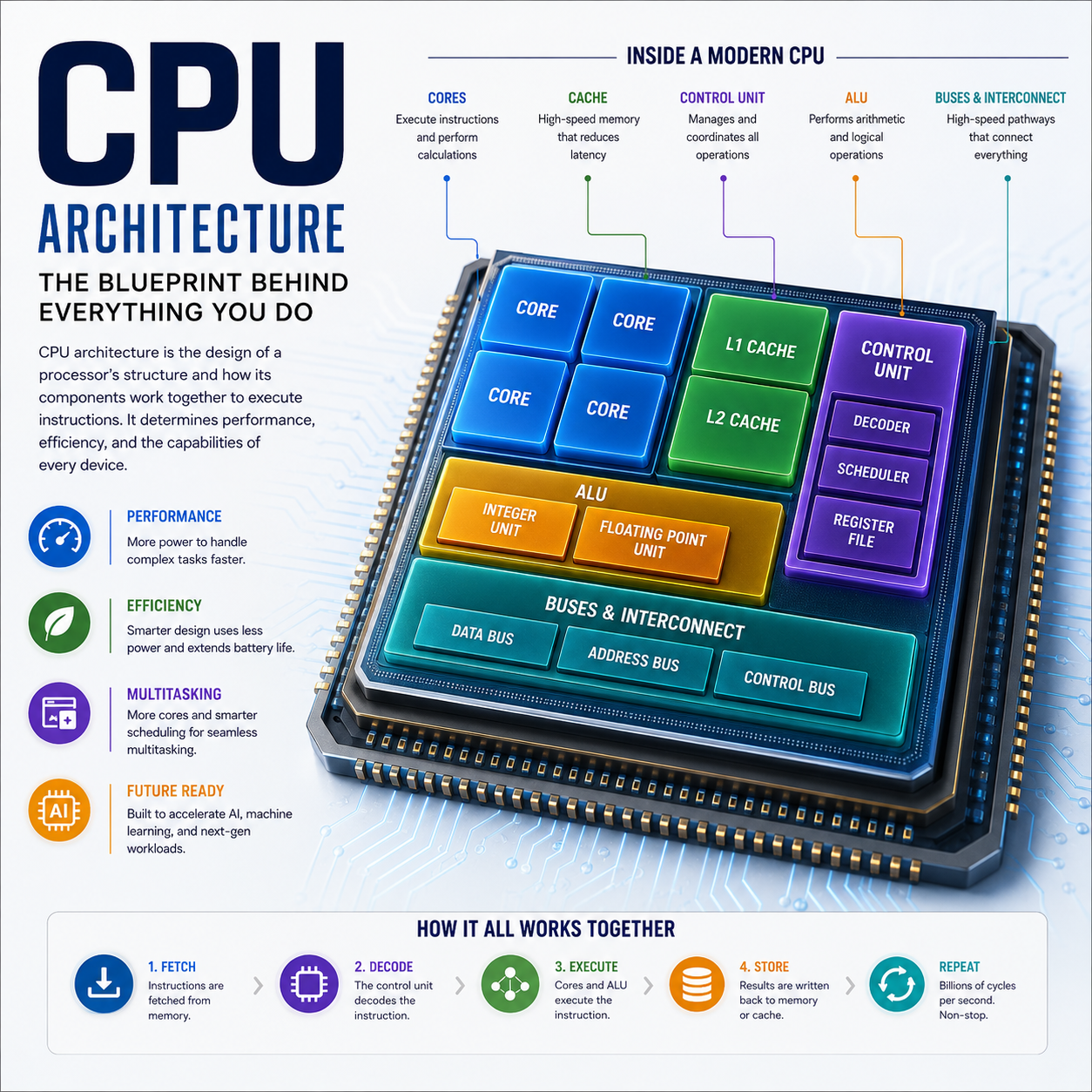
When you open an application, load a webpage or perform a calculation, software generates instructions that eventually have to be executed by a processor.
A modern CPU does not simply receive an instruction and calculate its result immediately.
Instead, it performs a sophisticated sequence:
Software
   ↓
Instructions
   ↓
Fetch
   ↓
Decode
   ↓
Rename / Schedule
   ↓
Execute
   ↓
Memory Access
   ↓
Retire
   ↓
Result
This process can involve hundreds of internal operations occurring simultaneously.
That is the essence of CPU architecture.
1. What Is CPU Architecture?
Full Definition
CPU architecture is the organization and design of a central processing unit that determines how it represents, fetches, decodes, schedules, executes and completes instructions, how it interacts with registers, memory and caches, and how its internal hardware resources are arranged to achieve a particular balance of performance, power efficiency, latency and complexity.
CPU architecture exists at multiple levels.
The two most important distinctions are:
Instruction Set Architecture : ISA
The programmer-visible instruction and execution model.
Microarchitecture
The internal hardware implementation used to execute that ISA.
This distinction is fundamental.
2. ISA vs Microarchitecture
Two processors can implement the same ISA while having completely different internal designs.
| Concept | Definition | Examples |
|---|
| ISA | The architectural instruction contract visible to software | ARM, x86, RISC-V |
| Microarchitecture | Internal hardware design used to implement the ISA | Different CPU core designs |
| CPU architecture | Broad description encompassing the processor’s architectural organization | Core, pipeline, execution, memory system |
Therefore:
ARM is not a CPU core design. x86 is not a specific processor.
They describe instruction-set architectures.
3. What Is an Instruction?
An instruction is an encoded command that tells the processor to perform an operation.
Examples include operations conceptually equivalent to:
ADD
SUB
LOAD
STORE
COMPARE
BRANCH
MULTIPLY
A program consists of enormous sequences of such instructions.
The CPU continuously processes them.
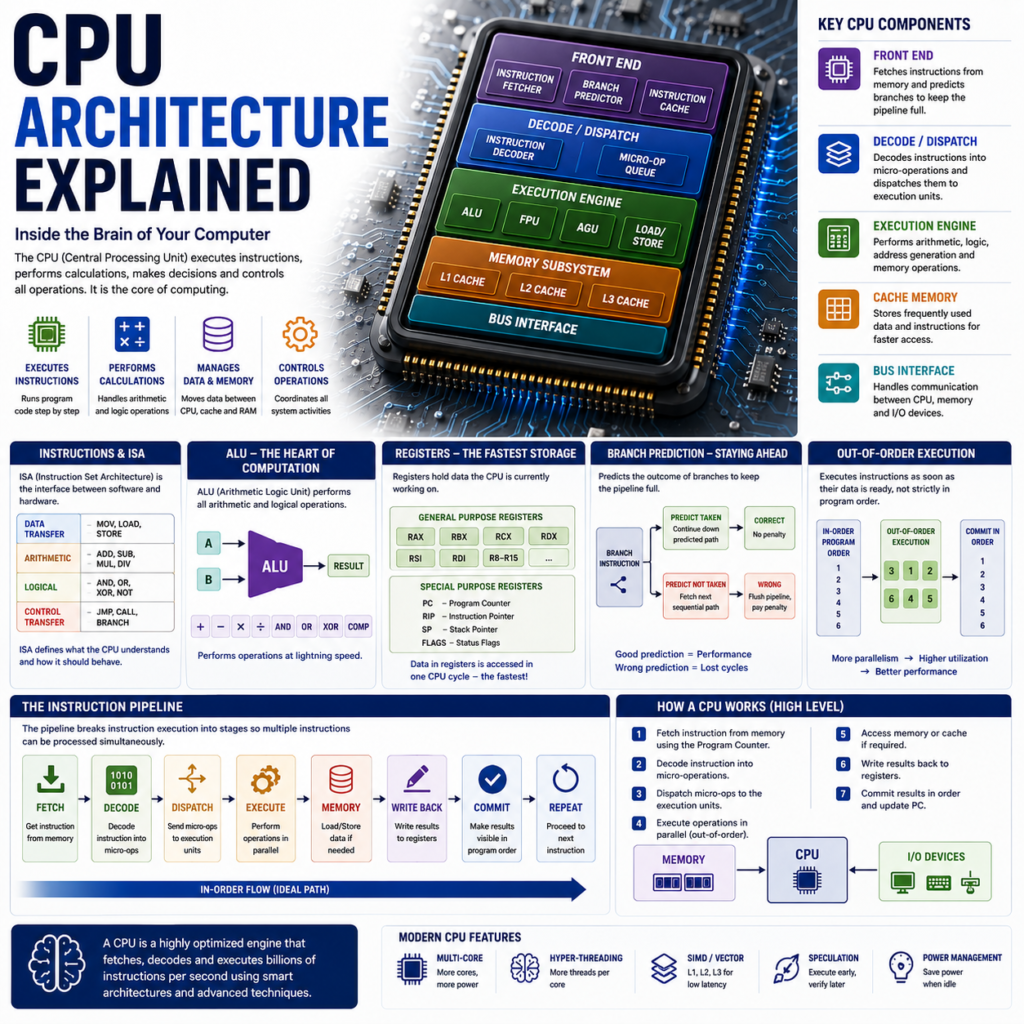
4. The Instruction Execution Cycle
The traditional simplified model is:
Fetch
  ↓
Decode
  ↓
Execute
  ↓
Memory
  ↓
Write Back
Modern CPUs are much more sophisticated, but this model is an excellent foundation.
5. Fetch
The CPU must first obtain instructions.
The instruction-fetch system determines:
- where the next instruction is
- whether it is already in cache
- whether the CPU should follow a branch
- how many instructions can be fetched per cycle
A simplified path:
Program Counter
      ↓
Instruction Cache
      ↓
Instruction Bytes
6. Program Counter
The Program Counter (PC) keeps track of the instruction location the CPU expects to execute next.
Conceptually:
Instruction 100
      ↓
Instruction 101
      ↓
Instruction 102
      ↓
Instruction 103
Branches and jumps can change this sequence.
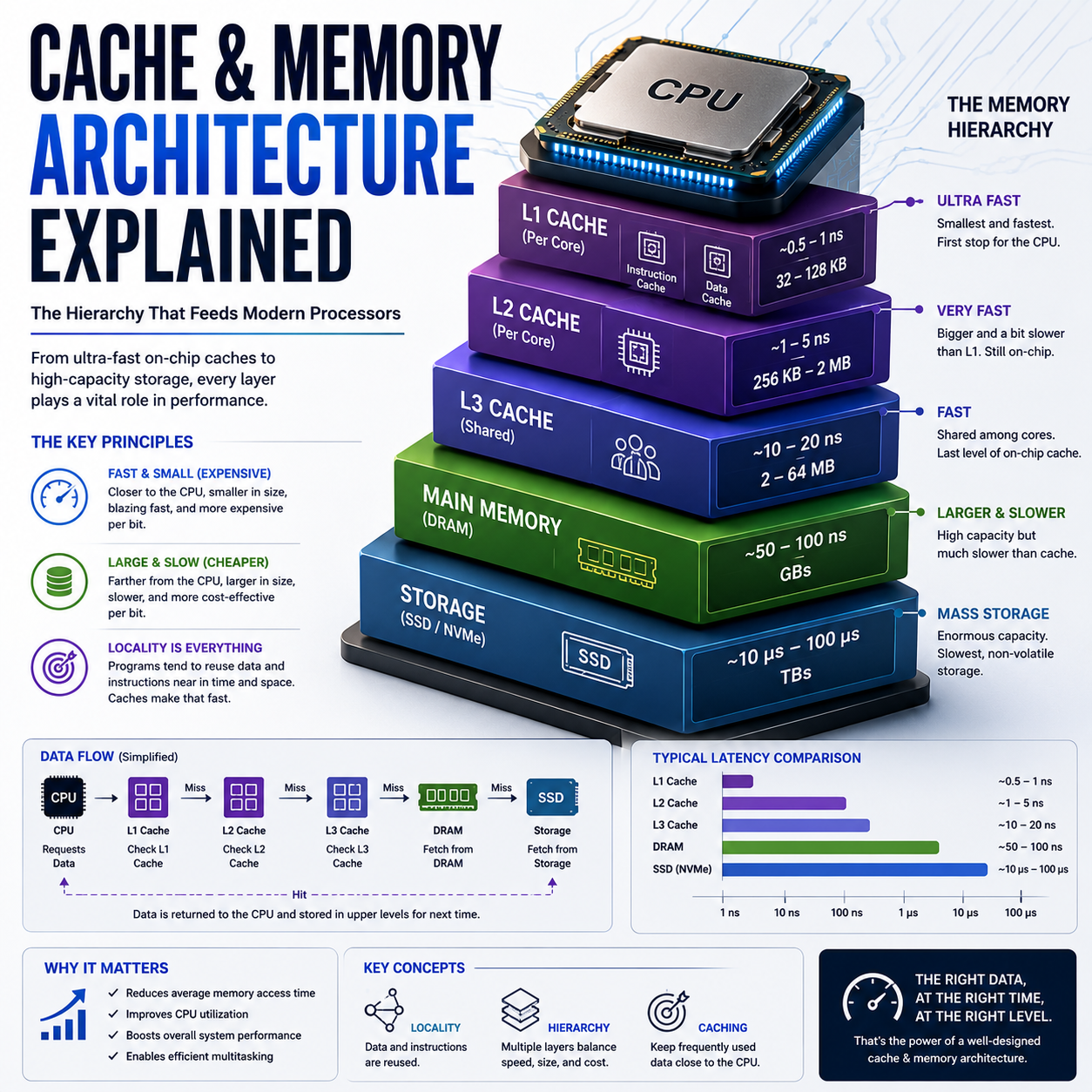
7. Instruction Cache
Instructions are stored in memory, but fetching them directly from main memory would be extremely slow compared with CPU execution speeds.
Therefore modern CPUs use caches.
A simplified hierarchy:
CPU Core
   ↓
L1 Instruction Cache
   ↓
L2 Cache
   ↓
L3 Cache
   ↓
RAM
The closer the memory is to the CPU core, the lower the access latency generally is.
8. Decode
The CPU must determine what an instruction means.
The decoder identifies:
- operation type
- source operands
- destination
- immediate values
- control information
Conceptually:
Encoded Instruction
       ↓
     Decoder
       ↓
Internal Operations
Modern processors may translate complex instructions into simpler internal operations known as micro-operations or µops.
9. Micro-Operations
A complex instruction can be internally represented as one or more smaller operations.
Machine Instruction
       ↓
Decode
       ↓
µop 1
µop 2
µop 3
       ↓
Execution
This allows the CPU’s internal machinery to use standardized execution resources.
The exact implementation differs among architectures.
10. Dispatch
After instructions have been decoded, the CPU needs to send the resulting operations toward appropriate execution resources.
The processor considers:
- operand availability
- execution-unit availability
- dependencies
- scheduling
- resource conflicts
This is where the CPU begins exploiting instruction-level parallelism.
11. Instruction-Level Parallelism
Instruction-Level Parallelism : ILP
is the ability to execute multiple independent instructions at overlapping times.
Suppose:
A = B + C
D = E + F
G = H × I
These operations may be independent.
A modern CPU can potentially process parts of them simultaneously.
This is one reason modern CPUs can perform much more work per clock cycle than older designs.
12. CPU Pipeline
A pipeline divides instruction processing into stages.
A simplified pipeline might be:
Fetch
 ↓
Decode
 ↓
Execute
 ↓
Memory
 ↓
Write Back
While one instruction is executing:
Instruction 1 → Execute
Instruction 2 → Decode
Instruction 3 → Fetch
Multiple instructions therefore occupy different pipeline stages simultaneously.
13. Pipeline Depth
A processor can use relatively few or many pipeline stages.
A deeper pipeline can potentially allow higher clock frequencies because each stage performs less work.
But deeper pipelines can increase the penalty associated with:
- branch misprediction
- pipeline flushes
- certain dependencies
Therefore:
A deeper pipeline is not automatically a better pipeline.
14. Pipeline Throughput vs Latency
These concepts must be separated.
Latency
How long one operation takes to complete.
Throughput
How many operations can be completed over time.
A pipeline can have relatively high latency while still achieving high throughput.
This distinction becomes important when analyzing CPU performance.
15. Registers
Registers are extremely fast storage locations inside the CPU architecture.
They hold values that instructions are actively using.
Conceptually:
CPU
│
├── Register 1
├── Register 2
├── Register 3
└── Register 4
Accessing registers is generally much faster than accessing main memory.
16. Register File
The collection of processor registers is called the register file.
It provides the execution system with operands and stores intermediate results.
Different ISAs define different architectural register models.
17. ALU
ALU = Arithmetic Logic Unit
The ALU performs fundamental integer operations such as:
- addition
- subtraction
- logical operations
- comparisons
- bit operations
Conceptually:
A ──┐
    ├──→ ALU → Result
B ──┘
Modern CPUs may contain multiple integer execution units.
18. FPU
FPU = Floating-Point Unit
Floating-point hardware performs numerical operations involving floating-point representations.
Common workloads include:
- scientific computing
- simulations
- graphics-related calculations
- engineering
- certain media workloads
Modern processors may have multiple floating-point/vector execution resources.
19. Load/Store Units
CPU instructions frequently need to move data between:
memory
and:
registers.
Load/store units manage these operations.
Memory
  ↕
Load / Store Unit
  ↕
Registers
Memory access can become a major performance bottleneck.
20. Execution Units
A modern CPU does not have one universal calculator.
It contains multiple execution resources.
A simplified core may include:
CPU Core
│
├── Integer ALU
├── Integer ALU
├── Load Unit
├── Store Unit
├── Branch Unit
├── Floating-Point Unit
└── Vector / SIMD Unit
This allows different operations to execute in parallel.
21. Branches
Programs constantly make decisions.
For example:
IF X > 10
   ↓
Do A
ELSE
   ↓
Do B
The CPU may not immediately know which path will be taken.
This creates a major performance challenge.
22. Branch Prediction
Modern CPUs use branch prediction to predict which path the program will follow.
Conceptually:
Branch
  ↓
Prediction
  ↓
Likely Path
  ↓
Begin Work
If the prediction is correct, the CPU saves time.
If it is wrong:
Wrong Prediction
      ↓
Discard Work
      ↓
Pipeline Recovery
      ↓
Correct Path
This is called a branch misprediction.
23. Speculative Execution
Modern CPUs can execute instructions before it is certain that they will actually be needed.
This is:
speculative execution.
The processor predicts future control flow and begins work early.
If the prediction is correct:
use the results.
If incorrect:
discard the speculative work.
Speculation is a major performance technique.
24. Out-of-Order Execution
A simple processor might execute instructions strictly in program order.
Modern high-performance CPUs can often execute independent instructions in a different internal order.
For example:
Program Order:

A
B
C
D
If B is waiting for data:
A → Execute
C → Execute
D → Execute
B → Wait
The CPU can keep its execution resources busy.
This is:
out-of-order execution — OoO.
25. Why Out-of-Order Execution Matters
Real software contains dependencies and memory delays.
Without out-of-order execution:
CPU
 ↓
Wait
 ↓
Idle Resources
With out-of-order execution:
CPU
 ↓
Instruction Waiting
 ↓
Find Independent Work
 ↓
Execute Other Instructions
This increases utilization.
26. Register Renaming
Out-of-order execution introduces another challenge:
register dependencies.
Modern processors use register renaming to separate architectural registers from physical registers.
Conceptually:
Architectural Register
        ↓
Physical Register
This allows the CPU to eliminate certain false dependencies and increase instruction-level parallelism.
27. Reorder Buffer
Out-of-order execution creates another requirement.
Although instructions may execute in a different internal order, the processor generally needs to preserve the appropriate architectural behavior.
A reorder buffer — ROB helps track in-flight operations until they can be retired in the correct architectural sequence.
Conceptually:
Execute Out of Order
        ↓
Reorder / Retire
        ↓
Architectural State
28. Retirement
Retirement or commit is the stage where completed instructions are formally reflected in the processor’s architectural state.
This lets the CPU execute aggressively internally while maintaining the expected program behavior externally.
29. Dependency Types
Instruction dependencies can limit parallelism.
Read After Write : RAW
An instruction needs a result produced by an earlier instruction.
Write After Read : WAR
A later write must not occur before an earlier read.
Write After Write : WAW
Multiple instructions write the same destination.
Modern CPU techniques such as register renaming help address certain false dependencies.
30. SIMD and Vector Processing
SIMD = Single Instruction, Multiple Data.
Instead of applying an operation to one value:
A + B
a SIMD unit can process multiple values with one instruction:
[A1 A2 A3 A4]
+
[B1 B2 B3 B4]
producing:
[C1 C2 C3 C4]
This is valuable for:
- multimedia
- image processing
- scientific computing
- machine learning
- signal processing
31. Vector Units
Modern ISAs can provide vector instructions and vector registers.
These are especially useful for workloads involving large collections of numerical data.
Vector processing creates a bridge between:
CPU general-purpose computing
and:
GPU-style parallelism.
32. CPU Cache Architecture
The CPU depends heavily on cache.
A common hierarchy is:
CPU Core
 ↓
L1
 ↓
L2
 ↓
L3
 ↓
RAM
L1
Smallest and generally fastest.
L2
Larger, somewhat slower.
L3
Larger shared cache in many designs.
RAM
Much larger but substantially higher latency.
33. Cache Hit vs Cache Miss
If the required data is already in cache:
cache hit
If it is not:
cache miss
Conceptually:
Request
 ↓
L1?
 ├── YES → Fast access
 └── NO
      ↓
     L2?
      ├── YES
      └── NO
           ↓
          L3 / RAM
Cache misses can create significant delays.
34. CPU Architecture Specification Table
| Specification / Concept | Definition | Performance Relevance |
|---|
| Clock Frequency | Number of clock cycles per second | Influences potential execution rate |
| IPC | Instructions completed per cycle under a defined workload/model | Indicates architectural efficiency |
| Core Count | Number of CPU cores | Parallel workload capacity |
| Pipeline Depth | Number of stages used in instruction processing | Affects frequency and branch penalties |
| Execution Width | Number of operations/instructions that can be processed in relevant stages | Affects potential ILP |
| Cache Size | Capacity of processor cache | Helps reduce memory-access latency |
| Cache Latency | Time required to obtain cached data | Important for responsiveness |
| Branch Prediction | Hardware prediction of control-flow paths | Reduces control-flow stalls |
| OoO Execution | Executing independent instructions out of program order | Improves hardware utilization |
| SIMD / Vector | One instruction operates on multiple data elements | Accelerates data-parallel workloads |
| Memory Bandwidth | Data transferred between processor and memory per unit time | Important for memory-heavy workloads |
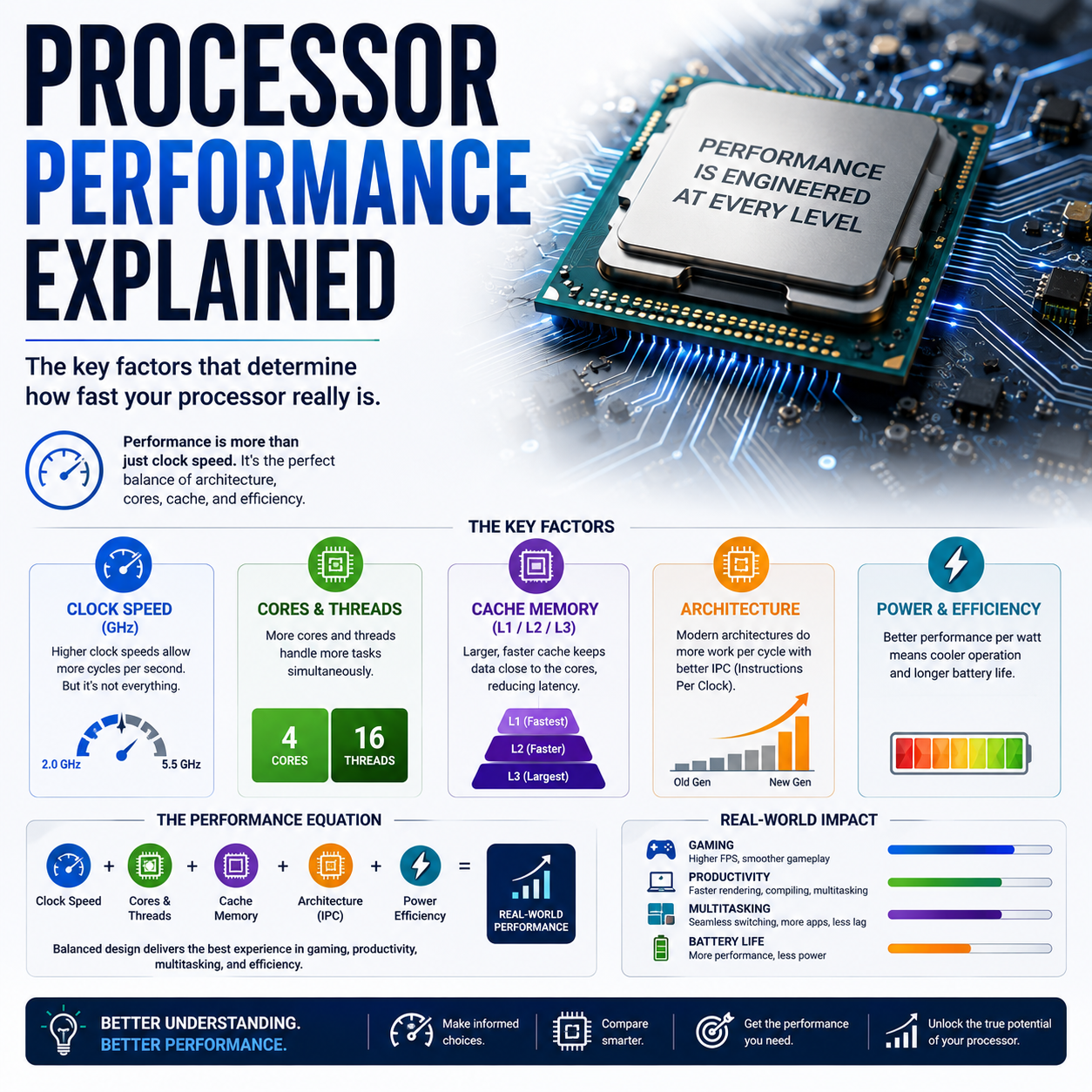
35. Clock Speed vs IPC
A simplified performance relationship is:
CPU Performance
≈
IPC × Clock Frequency × Useful Work
This is not a complete benchmark equation.
But it demonstrates why:
4 GHz CPU A
can outperform:
5 GHz CPU B
if CPU A achieves substantially higher work per cycle.
36. CPU Architecture vs CPU Performance
Architecture determines the potential.
Performance depends on more than architecture.
A useful model is:
Real-World CPU Performance
=
Microarchitecture
×
Clock
×
Memory
×
Software
×
Power
×
Thermals
×
Workload
This is why benchmark results are essential when making product comparisons.
37. Power and CPU Architecture
Higher performance frequently requires additional power.
The processor must balance:
Performance
    ↕
Power
    ↕
Temperature
Modern CPU design therefore focuses heavily on:
performance per watt.
This becomes especially important in smartphones and thin laptops.
38. CPU Architecture in Smartphones
Mobile CPUs prioritize:
- performance per watt
- low idle power
- responsiveness
- heterogeneous cores
- thermal efficiency
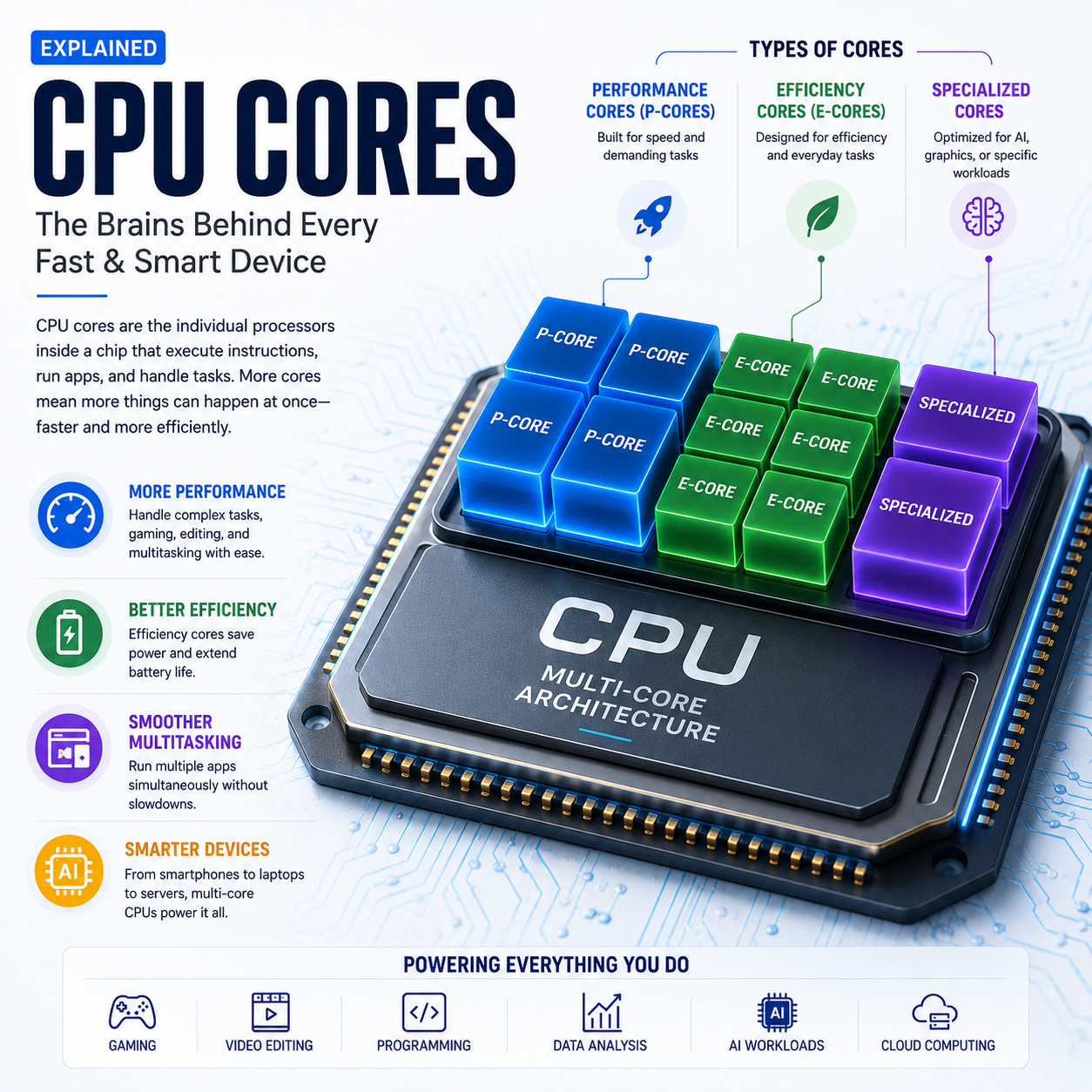
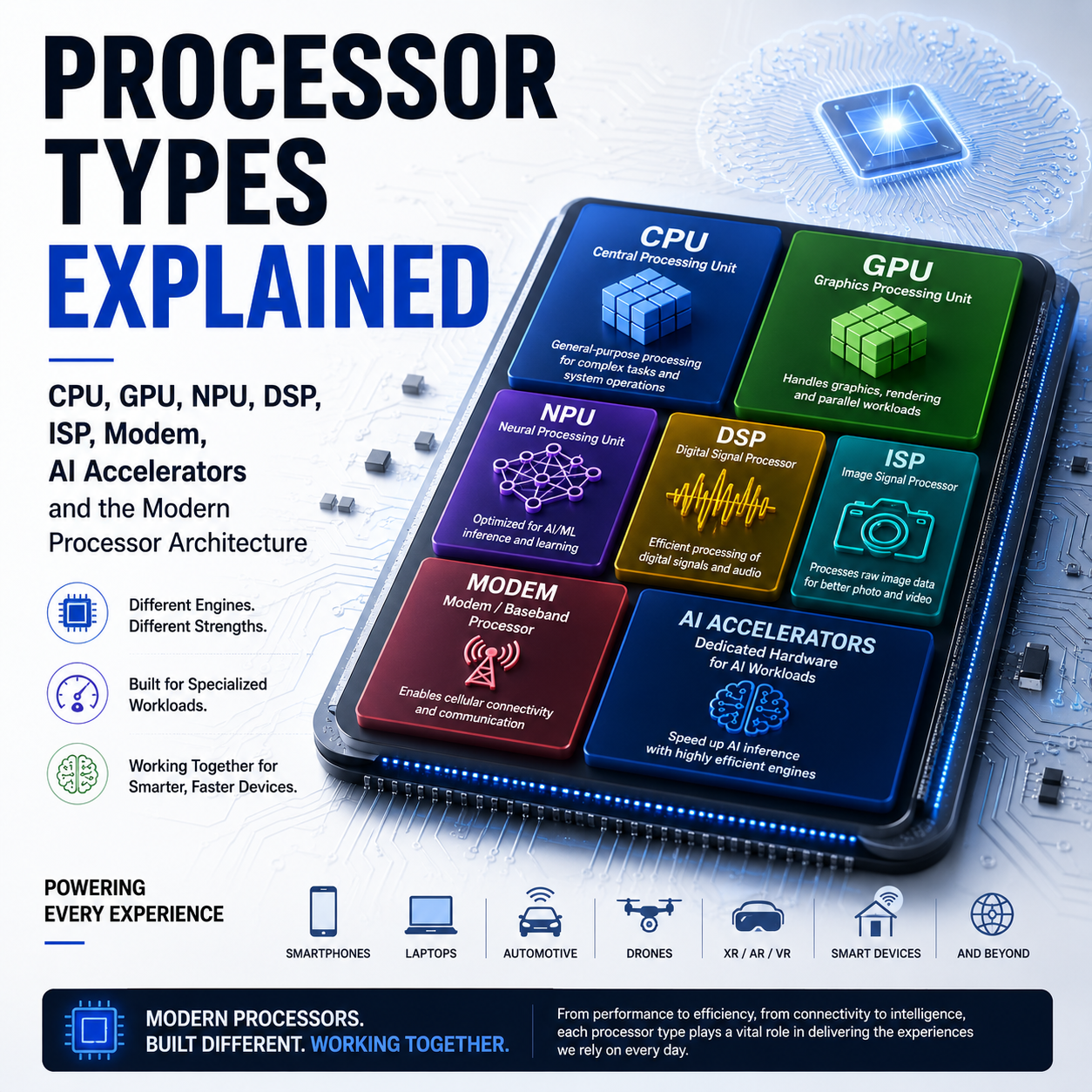
A smartphone SoC may combine:
Performance Cores
+
Efficiency Cores
+
GPU
+
NPU
+
ISP
+
Modem
The CPU is therefore one component of a much larger computing system.
39. CPU Architecture in Laptops
Laptop CPUs increasingly combine:
- high-performance CPU cores
- efficiency cores
- integrated GPU
- NPU
- media engine
- memory controller
This reflects the transition toward heterogeneous computing.
40. CPU Architecture in Desktops and Servers
Desktop and server processors can prioritize:
- high single-thread performance
- high multi-thread throughput
- large cache
- memory bandwidth
- scalability
- sustained power
Server processors additionally emphasize:
- reliability
- virtualization
- memory capacity
- multi-socket or multi-chip scaling
- security
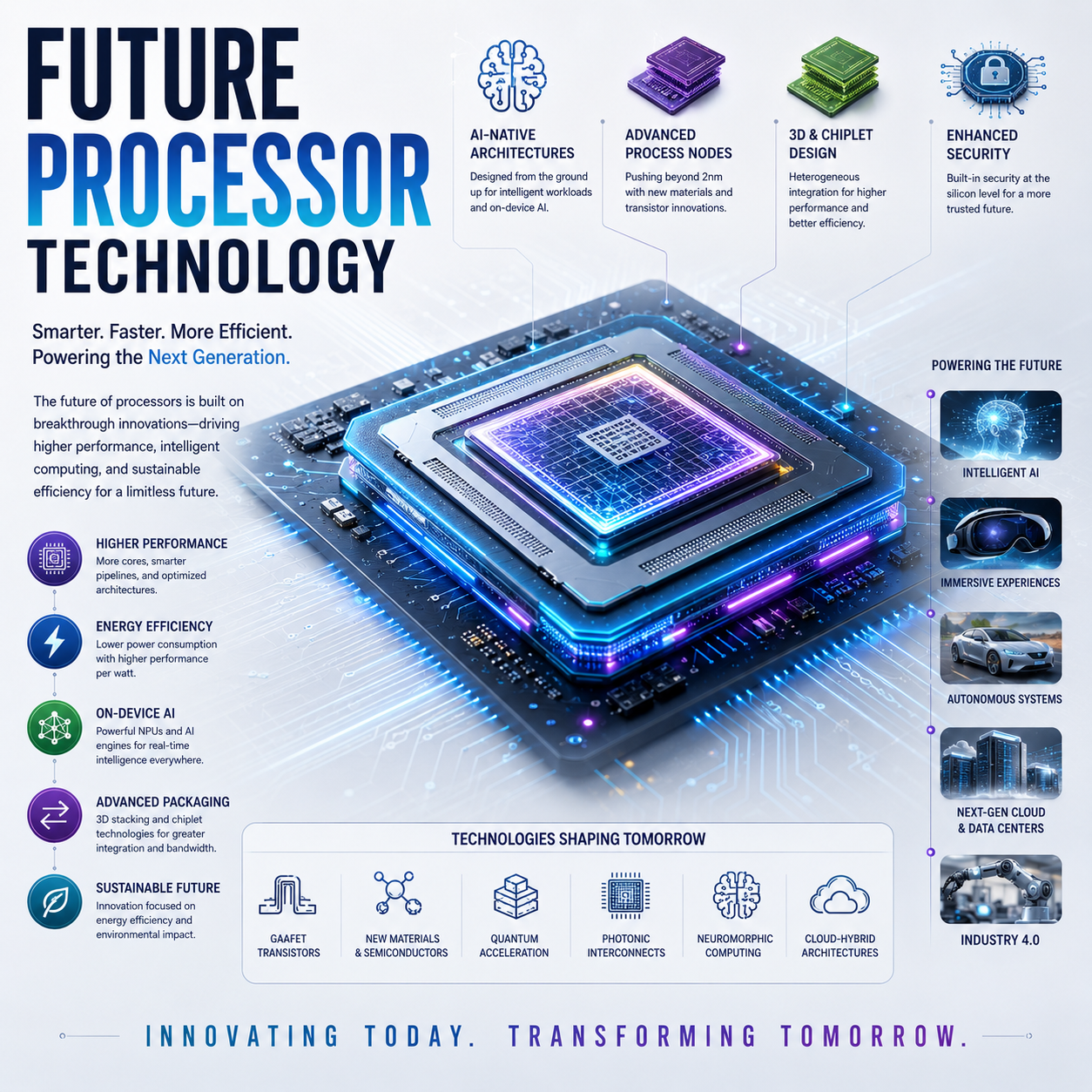
41. CPU Architecture and AI
CPUs remain important for AI even when dedicated accelerators are present.
The CPU may handle:
- application logic
- orchestration
- preprocessing
- scheduling
- unsupported operations
- data movement
The architecture increasingly looks like:
CPU
 ↓
Coordinates
 ├── GPU
 ├── NPU
 └── Other Accelerators
42. CPU Architecture and Software
Hardware architecture only becomes useful through software.
The chain is:
Application
 ↓
Compiler / Runtime
 ↓
Operating System
 ↓
Instruction Set
 ↓
CPU Microarchitecture
 ↓
Execution
Compilers can optimize code for:
- vector instructions
- cache behavior
- branch behavior
- multiple cores
- specific processor features
43. Why Modern CPU Architecture Is So Complex
The CPU has to solve several problems simultaneously:
Execute more work
Increase throughput.
Respond quickly
Reduce latency.
Predict future instructions
Branch prediction.
Keep execution units busy
Out-of-order scheduling.
Reduce memory delays
Caches and prefetching.
Minimize energy
Power management.
Maintain correctness
Retirement and architectural state.
The result is a highly sophisticated computational machine.
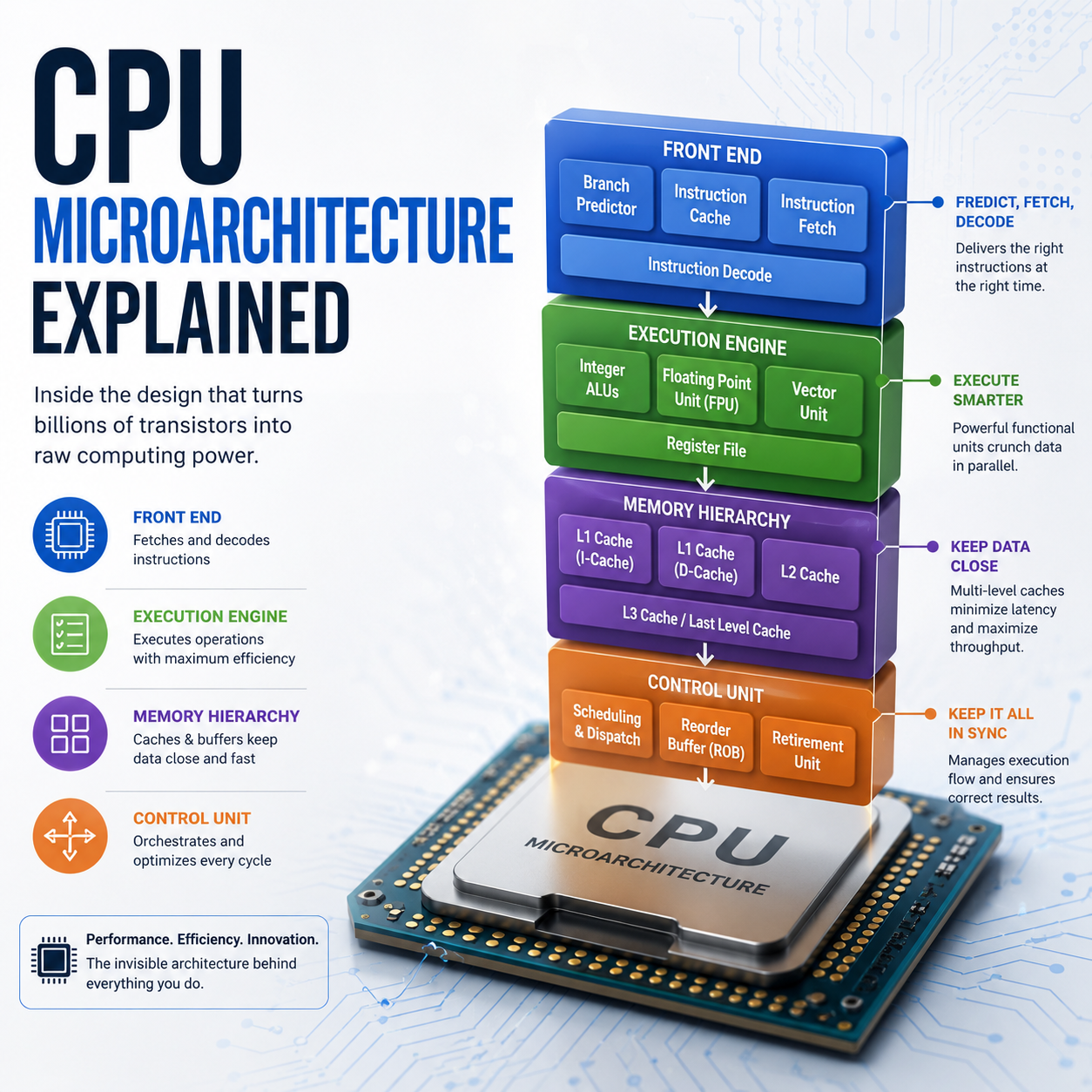
44. The Modern CPU Core
A simplified conceptual architecture:
                   CPU CORE
                      │
             ┌────────┴────────┐
             │                 │
        Instruction           Data
           Path               Path
             │                 │
          Fetch              Load
             ↓                 ↓
          Decode             Store
             ↓
       Register Rename
             ↓
          Scheduler
             ↓
   ┌─────────┼──────────┐
   ↓         ↓          ↓
 Integer    FP/Vector   Branch
   │         │          │
   └─────────┼──────────┘
             ↓
       Reorder / Retire
             ↓
       Architectural State
This is simplified, but it captures the central architecture.
45. The Complete CPU Instruction Journey
Program
   ↓
Instruction
   ↓
Program Counter
   ↓
Instruction Cache
   ↓
Fetch
   ↓
Decode
   ↓
µops
   ↓
Register Rename
   ↓
Scheduling
   ↓
Execution
   ├── ALU
   ├── FPU
   ├── Vector
   ├── Load
   ├── Store
   └── Branch
   ↓
Results
   ↓
Reorder Buffer
   ↓
Retirement
   ↓
Architectural State
This is the core concept readers need to understand before we move to CPU core design.
46. What CPU Specifications Do Not Tell You
A specification sheet cannot fully reveal:
- branch-prediction quality
- scheduler sophistication
- execution-unit utilization
- cache behavior
- memory latency
- compiler efficiency
- workload scaling
- sustained performance
- thermal throttling
Therefore:
CPU architecture must be evaluated through both specifications and measured behavior.
47. Key CPU Architecture Terms
| Term | Simple Meaning |
|---|
| ISA | Instruction-set contract |
| Microarchitecture | Internal CPU implementation |
| Instruction | Encoded operation |
| µop | Internal micro-operation |
| Pipeline | Staged instruction-processing system |
| ALU | Integer arithmetic and logic hardware |
| FPU | Floating-point computation hardware |
| Register | Very fast CPU storage |
| Cache | Fast memory close to CPU execution |
| Branch Predictor | Predicts future program paths |
| Speculation | Executes predicted work early |
| Out-of-Order | Executes independent work in a different internal order |
| Register Renaming | Maps architectural registers to physical registers |
| ROB | Tracks in-flight operations toward retirement |
| SIMD | One instruction across multiple data elements |
| IPC | Work/instructions per clock cycle |
48. The Big Picture
A CPU is not simply:
cores + GHz.
Its actual architecture is a coordinated system:
Instruction Set
      ↓
Front End
      ↓
Prediction
      ↓
Decode
      ↓
Rename
      ↓
Schedule
      ↓
Execution
      ↓
Memory
      ↓
Retirement
Every stage contributes to performance.
49. Final Takeaway
The fundamental purpose of CPU architecture is to maximize useful computation while maintaining:
- correctness
- low latency
- high throughput
- manageable power consumption
- thermal stability
- software compatibility
Modern CPU design achieves this through a combination of:
pipelines + multiple execution units + branch prediction + speculation + out-of-order execution + register renaming + caches + vector processing + sophisticated memory systems.
The result is a processor capable of keeping many operations in flight simultaneously.